 |
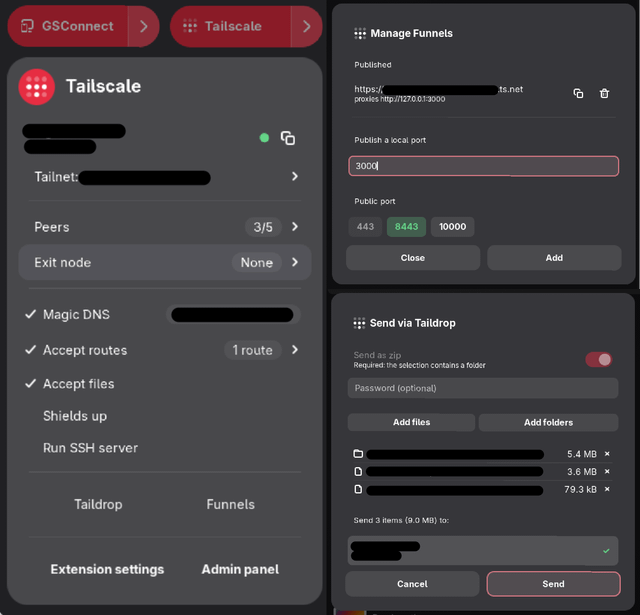
I've been running Tailscale on a GNOME desktop for a while and kept dropping into a terminal for things that felt like they belonged in the panel. So I wrote an extension that puts them there. It lives in the GNOME Quick Settings menu, right next to Wi-Fi and Bluetooth: connect, switch accounts, pick an exit node, send and receive files with Taildrop, publish a service with Funnel. Full feature list here: https://github.com/Disk-MTH/Tailscale-Gnome#features Worth saying how this differs from the built-in `tailscale systray` (https://tailscale.com/docs/features/client/linux-systray). That one is a tray app, and GNOME has had no tray since 3.26, so on GNOME you need a separate AppIndicator extension just to see it, and it then sits in a corner that doesn't belong to any of your other system controls. This extension is a native Quick Settings component instead, so it looks and behaves like the Wi-Fi and Bluetooth tiles. It also does quite a lot more than the systray menu: full Taildrop send and receive with a portal file picker, folder zipping and a "Send with Taildrop" entry in the Nautilus right-click menu, Funnel publishing with copy and remove from a single dialog, a panel warning when the exit node you picked stops routing, configurable notification categories, bindable keyboard shortcuts, and a preferences window. It drives the official `tailscale` CLI you already have, so it doesn't bundle or replace anything, and it makes no network calls of its own. The only thing that ever asks for a password is a one-time `tailscale set –operator=$USER` through polkit; after that everything runs prompt-free. Every elevated command is a literal argument vector you can read in the source, no shell string building. GNOME Shell 49 and 50, Wayland and Xorg, GPL-2.0-or-later, English, French, German and Italian. Install: https://extensions.gnome.org/extension/10017/tailscale/ Source: https://github.com/Disk-MTH/Tailscale-Gnome Not affiliated with Tailscale Inc., just a user who wanted the buttons closer. Headscale and other custom login servers, plus Mullvad exit nodes with country flags, are the two things missing today. Both are planned and coming in the near future. Bug reports and feature requests very welcome in the meantime. submitted by /u/Disk_MTH to r/Tailscale |
![[link]](https://i.redd.it/kojmaxf43qhh1.png)
Source: r/Tailscale · by /u/Disk_MTH