Hi everyone,
I’m using a PS4 Slim running firmware 13.52. I had been waiting for a way to jailbreak my PS4 for quite some time, and I was finally able to get the jailbreak working through the browser-based method.
I’m sharing the steps that worked for me. If you’re also on PS4 firmware 13.02–13.52, you can follow the same process.
Step 1 – Configure the DNS
Go to:
Settings → Network → Set Up Internet Connection → Use Wi-Fi → Custom → Use Wi-Fi → Select your network and fill the password→ Automatic → Do Not Specify → Manual → Primary DNS 62.210.38.117
The 62.210.38.117 DNS is commonly used to block Sony's update/PSN connections while using the jailbreak setup.
After completing these settings, return to the PS4 Home Screen.
Step 2 – Run the Jailbreak
Open the Internet Browser on your PS4.
You can optionally clear the browser data/cache first.
Then enter:
The exploit page should load.
Follow the instructions shown on the page and press X when prompted.
For me, it took around 2 minutes to complete.
Once the exploit finishes successfully, you should receive confirmation that the HEN payload has loaded.
Step 3 – Disable Internet Connection
After the jailbreak has loaded, I recommend going to:
Settings → Network → Connect to the Internet → OFF
This helps prevent the console from communicating with Sony's servers while you're using the modified environment.
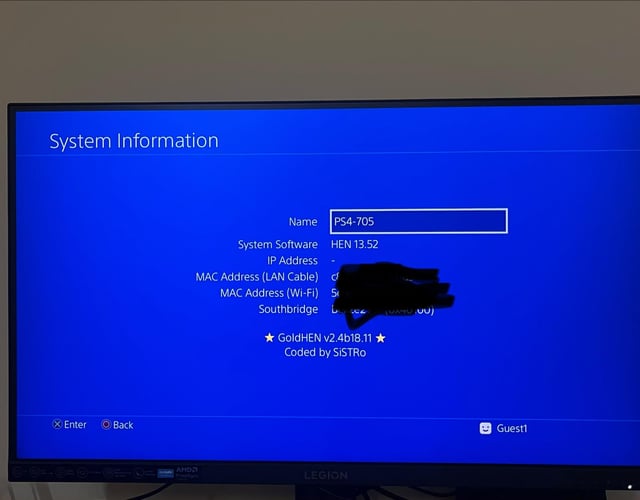
Step 4 – Verify the Jailbreak
Go to:
Settings → System → System Information
Check the system information to confirm that the HEN environment has loaded.
Hope this helps anyone who is also on PS4 13.52 and was waiting for a jailbreak. 🎮
https://i.redd.it/pmpzcoujppqh1.jpeg
Source: r/PS4Mods · by /u/mukesh_khan_dev