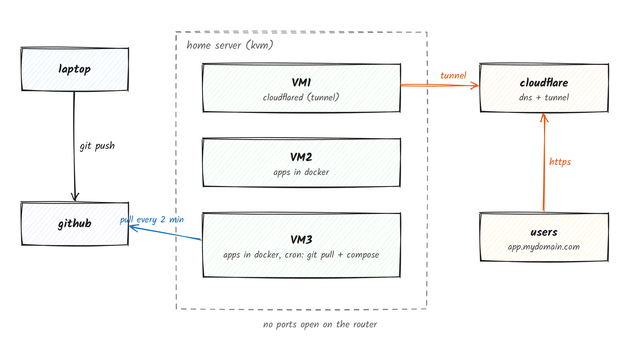
I run a few Docker VMs on one box at home (KVM/libvirt). For a while every deploy was the same ritual: SSH in, git pull, docker compose up -d --build, then go click around the Cloudflare dashboard to add a hostname. I kept forgetting a step.
So now it works like this:
- I
git pushto GitHub, like always. - On the VM, a cron job runs every 2 minutes, does
git fetchwith a read-only deploy key, and only if the branch moved it runsdocker compose up -d --build. Pushes that only touch docs or the Android folder are ignored. cloudflaredon one VM keeps an outbound tunnel open. Cloudflare mapsapp.mydomain.comtovm:port. Nothing is open on my router.
The first time, one command sets it all up: creates the deploy key, clones the repo on the VM, copies .env files over SSH (never committed), installs the cron job, adds the tunnel route and DNS record, then checks the URL answers.
hl deploy ./myapp --route myapp=3100 --watch Live example (a tiny page that shows its own deploy info): https://hello.voypalante.com
The hardware side
- One cheap desktop: AMD Athlon 3000G (2 cores, 4 threads, the one with Vega graphics), Biostar B450MH board, 16 GB DDR4-2666 (2×8), onboard gigabit Ethernet. Storage is all ZFS: a 1 TB Samsung NVMe (system), a 2 TB drive and a 16 TB drive. No GPU, no rack, it sits in a corner.
- 3 VMs on KVM/libvirt, each with Docker. The busiest one has 2 vCPU and 2 GB RAM and runs a journal app, a couple of side projects and this hello page. Load average sits around 0.1.
- One VM runs
cloudflaredfor the whole lab; the others don't need to know about Cloudflare. - Backups: ZFS snapshots of the VMs, two restic repos, and an off-site rsync. GitHub is also an off-site copy of every app's source.
- Real limit is my upload speed which is very slow in my area but I plan to upgrade my ISP contract sometime in the future.
How it compares:
| Tool | Runs where | UI | Needs on the server | Container registry | Open ports | Cost |
|---|---|---|---|---|---|---|
| hl (this) | Your VMs | No, CLI only | git, Docker, cron | No, builds on the VM | None (tunnel) | $0 + domain |
| Coolify / Dokploy | Your server | Yes, nice one | Their platform (a few containers) | No | Usually 80/443, or add a tunnel | $0 self-hosted |
| CapRover | Your server | Yes | Docker Swarm + their stack | No | 80/443 | $0 |
| Kamal | Your server | No | Docker, kamal-proxy | Yes | 80/443 | $0 |
| Portainer + Watchtower | Your server | Yes | Agent, Watchtower | Yes, images built elsewhere | Depends | $0 |
| Vercel / Netlify | Their cloud | Yes | Nothing | No | n/a | Free tier, then $20/user/mo |
| Railway / Render / Fly | Their cloud | Yes | Nothing | Optional | n/a | Usage based, a few $/mo and up |
In summary:
- You want a dashboard, logs in a browser, one-click databases: Coolify or Dokploy are great.
- You want deploys within seconds of a push: hl polls, so it's up to 2 minutes. No webhooks, on purpose (no inbound anything).
- You don't use GitHub or Cloudflare: hl is built around both.
What I like about doing it this way is that there is no deploy server to keep alive. If the box reboots, cron and Docker come back and that's it. The whole tool is one Python file with no dependencies, and every command has --json and --dry-run because I like to debug stuff.
Repo (MIT): https://github.com/faustinoaq/homelab-deploy
Happy to answer questions, or hear why this is a bad idea.
https://i.redd.it/4ytq43s5z9uh1.png
Source: r/homelab · by /u/UncommonSort