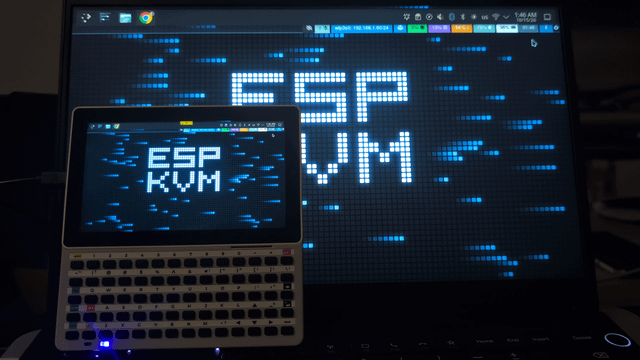
ESP-KVM is my open-source IP-KVM firmware for the ESP32-P4: a separate little board captures a computer's HDMI, pretends to be its USB keyboard and mouse, and serves the screen to a browser. The Tab5 has the same P4 inside, so I wrote a second firmware, ESP-KVM terminal, that makes the Tab5 a viewer for that box instead of a browser. The KVM stays plugged into the computer; the Tab5 talks to it over the network.
In the video the Tab5 follows the laptop behind it over Wi-Fi while a clip plays on the laptop.
How it works on the Tab5:
- The P4's hardware JPEG decoder unpacks the MJPEG stream, and the PPA scales and rotates each frame straight into the display buffer. Up to about 20 fps at 1280×720.
- Touch is the pointer, or a trackpad; pinch zooms in on small BIOS text.
- The Keyboard for Tab5 types on the target (found by itself over I2C), and so does a USB keyboard in the USB-A port.
- The menu has the target's power, reset and Wake-on-LAN buttons, and Ctrl+Alt+Del.
- It finds ESP-KVM devices with mDNS and works over Tailscale too.
No H.264: the P4 has no decoder for it, so the KVM has to send MJPEG.
Install: flash espkvm-term-merged.bin from the ESP-KVM terminal releases (replaces everything, M5 Launcher included), or put espkvm-term.bin on the SD card and install it from M5 Launcher.
It is an experiment, and I honestly do not know if anyone besides me wants this. There is a poll: would you use the Tab5 as a KVM screen?, and a "no" is as useful to me as a "yes".
https://v.redd.it/les8podqisvh1
Source: r/M5Stack · by /u/spitsynnet