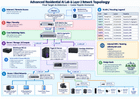
I’m about to do one final clean rebuild of my entire homelab and would appreciate a technical sanity check before I start.
Most of the hardware is already purchased, so I’m mainly looking for feedback on architecture, networking, security boundaries, failure domains, maintainability, and anything I’m unnecessarily overengineering.
I’ve attached two diagrams:
-
Final network/topology design
-
Hardware/node specification overview
GOAL
The goal is to build a self-hosted AI and automation platform that I can actually rely on every day, rather than just an experimental lab.
I want the system to handle:
– Local AI inference
– Agent orchestration
– Document/knowledge management
– Obsidian as my second brain
– Paperless-NGX
– Home Assistant
– Jellyfin
– Network monitoring/automation
– Secure remote access
– Local DNS and human-readable service names
– Automated backups
– UPS-controlled shutdown
– A sandbox where AI coding agents can safely build/test new tools
My AI orchestrator is Hermes Agent, which I call “Alfred.”
Alfred will eventually delegate tasks to specialized agents such as:
– Builder — coding/tool-development agent
– Scotty — network/homelab technical support
– Angel — family/device safety workflows
– Chef Boss — cooking/nutrition
– VA/DoD/benefits agents
– Temporary sub-agents created by Alfred as needed
The important part is that I do NOT want autonomous agents to automatically have unrestricted production or management access.
————————————————–
COMPUTE NODE #1 — MINISFORUM MS-A2
————————————————–
Role:
Proxmox VE host / application and orchestration node
Hardware:
– AMD Ryzen 9 9955HX
– 64 GB DDR5
– Intel Arc Pro B50 16 GB
– Kingston KC1000 ~1 TB NVMe
– Proxmox OS / templates
– Samsung 990 Pro 4 TB NVMe
– VM/LXC datastore
– Dual 10Gb SFP+
– 2 x 10Gb LACP uplink
Planned workloads:
– Alfred / Hermes
– Builder
– Scotty
– Angel
– Chef Boss
– Paperless-NGX
– Obsidian sync backend
– Home Assistant
– Jellyfin
– Pi-hole #1
– NGINX reverse proxy
– Optional Tailscale subnet router
– Monitoring services
I do not plan to install Docker directly on the Proxmox host.
Docker workloads will run inside appropriate Ubuntu VMs/LXCs.
————————————————–
COMPUTE NODE #2 — PUGET AI SERVER
————————————————–
Role:
Dedicated bare-metal AI inference / training server
Hardware:
– AMD Threadripper PRO 9975WX
– 256 GB ECC RDIMM
– NVIDIA RTX PRO 6000 Blackwell
– 96 GB VRAM
– ASUS Pro WS WRX90E-SAGE SE
– Mellanox ConnectX-4 Lx dual 10Gb SFP+
Storage:
M.2_1
Samsung 990 Pro 2 TB
– Ubuntu Server OS
– Docker
M.2_2
Samsung 9100 Pro 4 TB
– /srv/models
M.2_3
Samsung 990 Pro 4 TB
– /srv/datasets
M.2_4
Samsung 9100 Pro 2 TB
– /srv/scratch
Networking:
– 2 x 10Gb SFP+
– LACP
– 20Gb aggregate capacity
Software plan:
– Bare-metal Ubuntu Server
– Docker
– vLLM
– Shared OpenAI-compatible inference endpoint
The idea is that Alfred and all of the specialized agents use shared inference from this server instead of loading separate large models for every agent.
I’m currently planning to experiment with Qwen-family ~30–35B MoE models as the primary general model, then use smaller dedicated embedding/reranking models where needed.
————————————————–
STORAGE NODE — SYNOLOGY DS1823XS+
————————————————–
Hardware:
– AMD Ryzen V1780B
– 32 GB ECC RAM
– 8 x 12 TB HDD
– RAID 6
– Synology E10G30-F2 dual 10Gb SFP+
– 2 x NVMe SSDs available for cache
Networking:
– 2 x 10Gb SFP+
– LACP
Roles:
– Central backups
– Shared storage
– AI datasets
– Configuration backup vault
– Proxmox-related backups/storage as appropriate
– Pi-hole #2
The NAS currently has no data that needs preserved, so I plan to hard reset it and build the final storage configuration cleanly.
I may leave the NVMe cache disabled initially until I have actual workload data showing that it provides a meaningful benefit.
————————————————–
INTERNET / EDGE
————————————————–
ISP:
– ImOn Communications
– 1Gb symmetrical fiber
– GPON/ONT is already in bridge mode
– Public IP goes directly to the UDM Pro Max
Gateway:
UniFi UDM Pro Max
Responsibilities:
– WAN edge
– Firewall
– NAT
– DHCP for gateway-routed VLANs
– WireGuard VPN
– UniFi Protect
– DNS/DDNS-related edge services
The UDM connects to the core with:
– 1 x 10Gb SFP+
————————————————–
CORE NETWORK
————————————————–
Core:
UniFi USW Pro Aggregation
This will be the central high-speed switching fabric and hardware L3 routing point for the high-bandwidth trusted networks.
Planned 2 x 10Gb LACP trunks:
-
Minisforum MS-A2
-
Puget AI server
-
Synology DS1823xs+
-
USW Pro XG 10 PoE
-
USW Pro Max 24 PoE
I understand that 2 x 10Gb LACP means 20Gb AGGREGATE bandwidth and does not mean one TCP flow automatically gets 20Gb.
————————————————–
ACCESS SWITCHES
————————————————–
USW Pro XG 10 PoE
Role:
High-speed 10Gb copper client access
Primary devices include:
– Main admin/gaming workstation
– Other trusted high-speed clients
Uplink:
– 2 x 10Gb SFP+ LACP
USW Pro Max 24 PoE
Role:
– PoE access
– 2.5Gb / 1Gb devices
– Sim racing rig
– downstream switches
– cameras / infrastructure
USW Flex 2.5G 5
Location:
Printer room
Devices:
– K2 Plus Combo 3D printer
– K1 Max 3D printer
These will live on the IoT/Printer VLAN.
USW Lite 8 PoE
Location:
Attic
Devices:
– UniFi G4 Doorbell Pro PoE
– 2 x UniFi G5 Pro cameras
This switch currently needs to be hard reset/re-adopted because the first adoption attempt did not go correctly.
————————————————–
VLAN DESIGN
————————————————–
VLAN 99 — Management
10.10.99.0/24
VLAN 10 — Main-LAN
10.10.10.0/24
VLAN 20 — Servers-AI
10.10.20.0/24
VLAN 21 — Storage-Backend
10.10.21.0/24
Optional
VLAN 30 — WFH-Corp
10.10.30.0/24
VLAN 40 — IoT-Printers
10.10.40.0/24
VLAN 50 — Security
10.10.50.0/24
VLAN 60 — Gaming
10.10.60.0/24
VLAN 70 — Agent-Sandbox
10.10.70.0/24
Current routing plan:
Pro Aggregation hardware L3 routing:
– VLAN 10 Main-LAN
– VLAN 20 Servers-AI
UDM Pro Max routing/security enforcement:
– VLAN 30 WFH-Corp
– VLAN 40 IoT-Printers
– VLAN 50 Security
– VLAN 60 Gaming
– VLAN 70 Agent-Sandbox
– VLAN 99 Management
My reasoning is that the biggest east-west traffic will be:
Main workstation
<->
AI server
<->
Proxmox
<->
Synology
That traffic should be routed in the switching fabric rather than unnecessarily traversing the firewall.
One of the biggest things I want feedback on is whether this hybrid UDM + L3-switch routing model is worth the complexity.
————————————————–
OPTIONAL STORAGE VLAN
————————————————–
I’m considering VLAN 21 as a dedicated backend network between:
– Proxmox
– Synology
– Puget AI server
Potentially with MTU 9000.
However, I plan to build the entire network at MTU 1500 first.
Only after everything is stable would I test whether:
– dedicated storage networking
– jumbo frames
provide enough benefit to justify the added complexity.
————————————————–
DNS / DOMAIN DESIGN
————————————————–
I own:
unluckyvet.com
I plan to use split-horizon DNS heavily because human-readable names are much easier for me to work with than memorizing IP addresses and ports.
Examples:
alfred.unluckyvet.com
proxmox.unluckyvet.com
storage.unluckyvet.com
ai.unluckyvet.com
paperless.unluckyvet.com
jellyfin.unluckyvet.com
home.unluckyvet.com
obsidian-sync.unluckyvet.com
Internal services would resolve to private addresses.
I do NOT plan to publicly expose Proxmox, DSM, or the management plane.
NGINX will handle internal reverse proxying.
I plan to use ACME DNS-01 for proper TLS certificates without opening internal applications directly to the Internet.
————————————————–
DNS REDUNDANCY
————————————————–
Pi-hole #1:
MS-A2 / Proxmox
Pi-hole #2:
Synology
Both will serve internal DNS.
The goal is that rebooting Proxmox does not make DNS disappear for the house.
Client DHCP scopes would receive both Pi-hole addresses.
I do not plan to use something like 8.8.8.8 as secondary DNS because I don’t want clients bypassing local DNS records and filtering.
————————————————–
REMOTE ACCESS
————————————————–
I plan to use two independent remote-access methods.
Tailscale:
Primary convenient remote access for:
– Samsung Galaxy S26 Ultra
– M3 Max MacBook Pro
– other trusted devices
WireGuard on UDM Pro Max:
Independent recovery/admin path.
That way if Proxmox or the Tailscale subnet-router VM dies, I still have a VPN terminating directly on the gateway.
My Galaxy Watch would primarily act as a notification/voice companion through the phone rather than being treated as a full network-management endpoint.
————————————————–
OBSIDIAN / SECOND BRAIN
————————————————–
Obsidian will be my human-curated second brain.
I plan to keep the Obsidian applications local on:
– Main Windows workstation
– M3 Max MacBook Pro
– Galaxy S26 Ultra
The homelab will host the synchronization backend.
The conceptual separation I’m going for is:
Obsidian
= curated personal knowledge
Paperless-NGX
= original documents / records
Hermes memory
= AI operational memory
Synology
= durable storage / backups
Puget
= AI compute
Alfred should be able to search/use Obsidian and Paperless through controlled tools, but I do not want it freely rewriting important notes without safeguards.
————————————————–
AI AGENT SECURITY
————————————————–
This is probably the area I’m being the most cautious about.
VLAN 70 will be an Agent-Sandbox.
Builder and other generated/test workloads can run there.
Initial policy would roughly be:
ALLOW:
– Internet HTTPS/package repositories
– Git
– explicitly exposed development APIs
– AI inference endpoint if required
DENY:
– Management VLAN
– unrestricted Servers-AI access
– NAS management
– Proxmox management
– trusted Main-LAN
– firewall/network-management interfaces
I want Alfred to eventually be able to create:
– new agents
– new tools
– MCP integrations
– scripts
– automation workflows
But generating code should NOT automatically mean having permission to deploy that code into production.
I’m thinking in terms of capability levels:
Level 0:
Read/search/reason
Level 1:
Create files/scripts in sandbox
Level 2:
Modify application/service configuration with policy checks
Level 3:
Network changes, destructive actions, storage changes, Proxmox administration, firewall changes, etc.
Require explicit human approval.
————————————————–
TELEGRAM
————————————————–
I just created a private Telegram bot named Alfred.
Telegram will initially be my main conversational interface.
I plan to keep one Alfred bot rather than creating separate Telegram bots for every sub-agent.
Example:
“Alfred, have Scotty check the NAS.”
or:
“Alfred, ask Chef Boss what I can make with chicken tonight.”
Alfred then delegates internally.
————————————————–
GAMING
————————————————–
Main gaming/admin PC:
– VLAN 10
– 10Gb connection
Sim racing rig:
– VLAN 60
– 2.5Gb connection
Games include things like:
– Call of Duty
– Assetto Corsa / rally / sim racing
My DNS plan is still to use the local Pi-hole pair.
I understand DNS should not materially affect game latency once the game server connection is established.
I also plan to start with:
– Smart Queues OFF
– UPnP OFF
and only enable/change things if actual measurements show a problem.
————————————————–
POWER
————————————————–
UPS:
CyberPower PR1500RT2UC
1500VA / 1500W
USB will connect to the MS-A2.
The MS-A2 will run the NUT master.
Conceptual shutdown order:
-
Stop new AI workloads
-
Save checkpoints
-
Stop vLLM / heavy Docker workloads
-
Shut down Puget AI server
-
Stop nonessential Proxmox guests
-
Detach storage clients / flush writes
-
Shut down Synology
-
Shut down Proxmox
-
Keep networking alive as long as practical
I still need to measure actual full-rack peak draw.
I’m not assuming that a 1500W UPS automatically has enough headroom for the Puget + RTX PRO 6000 + NAS + switches + PoE load.
————————————————–
WHAT I’D LIKE FEEDBACK ON
————————————————–
-
Would you hardware-route VLAN 10 and VLAN 20 on the Pro Aggregation, or just let the UDM Pro Max route everything?
-
Any reason not to use the five planned 2 x 10Gb LACP trunks?
-
Is VLAN 21 as a dedicated storage backend worth doing?
-
Would you bother with MTU 9000 in this environment?
-
Would you run Pi-hole #2 on the Synology, or use another architecture?
-
Any concerns with Tailscale for normal remote access + UDM WireGuard as an independent recovery path?
-
How would you divide the Proxmox workloads differently with 64 GB RAM?
-
Does the VLAN 70 sandbox provide a reasonable boundary for autonomous coding agents?
-
What would you change about the Alfred/Hermes architecture?
-
Any obvious security holes?
-
Any obvious single points of failure I should address?
-
Any concerns with the UPS/NUT shutdown strategy?
-
What am I overengineering?
-
What am I overlooking that will annoy me six months from now?
————————————————–
FINAL NOTE
————————————————–
I’m deliberately trying to finalize the architecture BEFORE installing everything.
This will be the first Proxmox VE installation on the MS-A2 and the first Ubuntu Server installation on the Puget.
The Synology currently has no data on it, so it is also being reset and configured cleanly.
I’m not really looking for “buy another $5,000 of hardware” recommendations unless there is a genuine architectural problem.
I’d much rather hear criticism around:
– architecture
– reliability
– security
– failure domains
– complexity
– maintainability
– whether the performance decisions are justified
Feel free to tear the design apart.
I would rather fix something on paper now than discover it after the entire environment is built.
Thanks for taking a look.
https://www.reddit.com/gallery/1wmtxv9
Source: r/homelab · by /u/Luck1775