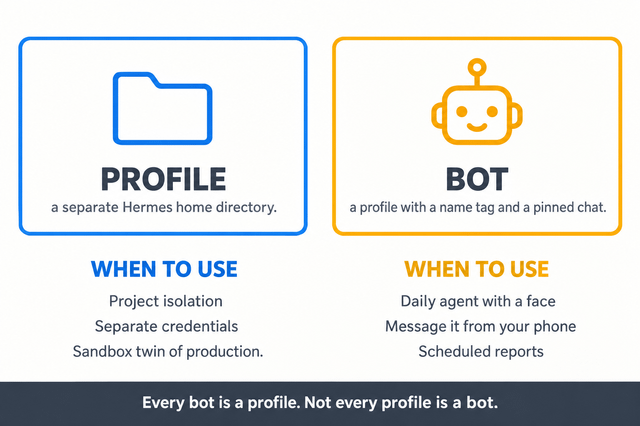
A bot is not a new kind of thing. It's a profile wearing a name tag.
Get that one sentence into your head and most of the confusion around Hermes terminology falls apart. I've been running a dozen-plus profiles on one machine for a few months: a couple of always-on messaging bots, several project controllers, one read-only critic, one tester. The same three questions keep coming up.
- Is a bot a profile, or something separate?
- Do I need a profile per bot, or a bot per profile?
- My bot is fine, but my "other agent" keeps forgetting things. Why?
All three come from one root cause. People treat "bot" and "profile" as two items in the same list. They aren't. One is infrastructure. The other is how you reach it.
The 30-second version
| Thing | What it actually is | Own memory/config? | Where you talk to it |
|---|---|---|---|
| Profile | A separate Hermes home directory | Yes, fully isolated | CLI, TUI (terminal UI), desktop, gateway, cron |
| Bot (Bot Mode) | A profile added to the desktop's roster of named agents, with a face and a pinned chat | Yes, it is a profile | Desktop Bots tab, CLI (same agent) |
| Messaging bot | A platform account (Telegram/Discord/Slack) connected through the gateway | No, it's a wire, not an agent | That platform |
| Subagent | A child conversation spawned by delegate_task for one task |
No, fresh temporary context | Nowhere, it reports back to its parent |
Read the middle two rows together and you get the rule the docs keep repeating: every bot is a profile, but not every profile is a bot.
The gateway, in case it's new to you, is the process that connects a profile to messaging platforms. One per profile, or one serving all of them. More on that below.
A profile is a home directory, and that's the whole trick
When you run hermes profile create research, you don't get a sub-agent or a mode. You get a directory: ~/.hermes/profiles/research/. Inside it lives its own config.yaml, .env, auth.json, SOUL.md, memories, skills, cron jobs, sessions, and state.db.
That's the primitive. Everything surprising about Hermes starts here.
- Each profile owns its credentials. A named profile resolves providers from its own
.envandauth.jsononly. It does not quietly inherit your default profile's keys. If a fresh profile asks you to set up a model, that's the design working, not a bug. - Each profile gets its own command. Create one called
coderandcoder chat,coder setup,coder gateway startall exist immediately. - A profile is only "real" when it has identity files. A stray directory under
profiles/missingconfig.yaml,.env,SOUL.md,profile.yaml,auth.json, andstate.dbis ignored byprofile listand by-p. Leftover log dirs don't pollute anything. - Credentials don't copy cleanly. Static API keys get carried by a clone. Single-use OAuth logins (Anthropic, OpenAI Codex, xAI) do not. A copied refresh token isn't a second credential, it's one credential with two owners, and whoever refreshes first revokes it for the other. Sign the new profile in itself.
One rule matters more than the rest: one home, one writer. Never point two agent processes at the same profile. Both write memory automatically, and each loads the other's writes into its system prompt at session start. They compound each other's state until the thing you configured isn't there anymore. If you want two agents sharing memory, use an external memory provider. Don't share a home.
A bot is one of two things, and the two get conflated constantly
Bot Mode bot. A profile you've added to the desktop roster: title, avatar, section, hidden state, pinned chat. That presentation lives in the profile's metadata, so the same bot appears the same way on every desktop connected to that backend. Underneath, it's still hermes -p <name> chat. Routines you attach to a bot are plain cron jobs named [bot:<name>] <routine>, visible in hermes cron list. Nothing new is running. You gave a profile a face and a home in the UI.
Messaging bot. A platform account: a Telegram bot token, a Discord app, a Slack app. It connects through the gateway. It isn't an agent and it has no memory of its own. It's a phone line, and the agent answering it is whichever profile's gateway holds that token.
So when someone says "my bot," they could mean either one.
"Why does my bot know about my project?" Because the profile behind it has that in memory.
"Why did my second bot stop replying when I started the first?" Because a token can only belong to one profile. The second gateway is refused with an error naming the conflict. The lock exists because two pollers on one token would otherwise fight over the same platform connection. It's also why hermes profile create --clone leaves messaging channels behind on purpose. There's a --clone-channels flag if you insist, and it warns you.
For completeness: a subagent is a child conversation from delegate_task. Fresh context, temporary, reports back and dies. A separate conversation is not a separate profile.
"But do bots have compression?"
This one gets asked wrong constantly, usually as "bots don't have compression, right?" They do. The real rule is next door.
Every profile, bot or not, runs the same machinery. Compaction and compression mean the same thing here, and the terms get used interchangeably.
- Gateway session hygiene at 85% of the model's context, running before the agent sees your message. It's a safety net for sessions that grew between turns, and overnight buildup in a Telegram thread is the classic case.
- The agent's own compressor at 50% by default, running inside the tool loop where token counts are real. This is the one doing the daily work.
- Manual
/compress, alias/compact, on any surface: CLI, messaging platforms, TUI, desktop. Typing it forces a pass right then.
What a bot can't do is start over.
A Bot Chat is a forever-chat by design. Type /new or /reset inside a bot's pinned chat and the composer reroutes it to /compact instead: fresh working context, same conversation. Forking the relationship into a scratch session is the one thing Bot Mode promises won't happen. Regular sessions on that same profile still get full /new freedom. Only the pinned chat is protected.
A messaging bot works the same way in practice. Gateway conversations don't reset on inactivity or at a day boundary. /new is a boundary you have to ask for. Nobody is going to reset that Telegram thread for you.
So the useful version of "bots don't have compression" is: bots can't clear the decks, which makes compression the only thing keeping them coherent, and it happens silently by default. Two things follow.
Long-lived bot chats quietly skip the learning loop. Memory gets injected at session start and distilled when a session ends. A chat that never ends does neither. Everything is still in context, so the agent has no reason to consult memory, and nothing gets saved on the way out. It works. It's also more expensive per turn than a fresh session with distilled memory. Every so often, ask the bot to remember what's worth keeping, then archive the Bot Chat from the sidebar. That retires it, and the next click starts a fresh pinned chat.
A forever-chat never restarts, so prompt-level changes reach it late. A running session rebuilds its system prompt and tool definitions at a compaction commit, which for a bot chat is the only boundary available. Changed a bot's persona or available tools and see no difference? Compress the chat once, or test it in a side chat, before you go digging in config.
Worth knowing: automatic compaction is invisible on chat surfaces by default. It happens at turn boundaries with no notice in the chat, logged server-side. If you want to see the "Compacting context…" lifecycle in Telegram, there's an opt-in for it. Failures and manual /compress feedback always show up either way.
How they reach the outside world
Each profile can run its own gateway: its own process, its own supervisor entry (ai.hermes.gateway-<name> on launchd, a user service on systemd, a scheduled task on Windows), its own bot tokens.
The alternative is one multiplexing gateway, where the default profile's gateway is the only inbound process and serves messages for every profile on the box. Multiplexing is on by default, but an unset flag isn't a verdict. The default gateway runs a preflight at each boot and only folds if it's safe: default profile present, two or more profiles, no secondary still running its own gateway, no duplicate bot credential, no port-binding platform without a /p/<profile>/ ingress. If the preflight holds back, it comes up serving the default profile only and logs why. An explicit true or false is never second-guessed.
A few things worth knowing:
- With multiplexing on, the served set is the default profile plus every live named profile under
profiles/. There's no per-profile opt-out list anymore. A profile you don't want served gets archived or deleted. - Shared by design: the process, its PID/lock, one HTTP listener, and the
profile_routestable. Everything else stays per profile, credentials included. Each turn resolves the routed profile's own config, skills, memory, SOUL, and provider keys. - Multiplexing is the right call for containers, VPS boxes, or a pile of low-traffic profiles. Stick with one process per profile when you want hard process isolation: separate memory footprints, independent crash domains, and the ability to restart one without touching the rest.
Knobs you'll actually touch
Profiles, bots, and compression all read from the same config shape, so the same knobs apply wherever the agent runs.
“`yaml compression: enabled: true threshold: 0.50 # agent compressor fires at this % of context protect_last_n: 20 # keep this many recent messages uncompressed progress_notices: false # show routine compaction notices in chat hygiene_max_turn_hold_seconds: 10 # how long a turn waits on hygiene before moving on
auxiliary: compression: model: "" # empty = your main chat model “`
Two I'd actually change: point auxiliary.compression.model at something fast and cheap so summarization isn't billed at flagship rates, and raise hygiene_max_turn_hold_seconds if you'd rather compression land inside the same turn and your chat platform tolerates a short pause. There are more where those came from, including threshold_tokens, protect_first_n, in_place, idle compaction, and the hygiene_* timeouts.
Commands worth memorizing
| Goal | Command |
|---|---|
| Create a profile | hermes profile create research |
| Clone your config into it | hermes profile create work --clone |
| Full copy, all memories and skills | hermes profile create backup --clone-all |
| Talk to it | hermes -p research chat |
| Run its gateway as a service | research gateway install then research gateway start |
| See every profile on the box | hermes profile list |
| See its scheduled work | hermes cron list |
| Force compression now | /compress (alias /compact) |
| Check context pressure | /context and /usage |
| Fold everything into one gateway | hermes gateway migrate --multiplex |
Mistakes that cost real time
- Two writers on one home. Covered above because it's the expensive one. One profile, one process.
- Assuming a clone carries your bots or your OAuth logins. It carries neither, both on purpose.
- Wrapping one token around two profiles. The second gateway gets refused, or the multiplexer parks the duplicate connection.
- Hiding a bot and thinking you turned it off. Hiding is display-only. Mentions still resolve, group memberships stay, routines keep firing.
- Treating a bot chat as a scratchpad.
/newwon't give you one. Open a side chat instead. - Treating a profile as a security boundary. This one bites people. A profile isolates configuration, sessions, skills, and profile-scoped memory. It is not filesystem, network, or OS isolation. Every profile on the box shares the machine, its files, and its network. If you're running code you don't trust, that's what a container or a VPS is for.
The takeaway
Profiles are the unit of identity: one home, one config, one memory, one writer. Bots are how profiles show up in the world, whether that's a roster entry with a face in the desktop or a platform account you can message from your phone.
Get the layering right and it stays simple. Get it wrong and you'll spend a weekend debugging memory that two processes were quietly fighting over.
Starting fresh? Make one profile, use it from the CLI until it's genuinely useful, and only then decide whether it deserves a face and a phone line.
Docs for the details, all current as of this post: Profiles · Bot Mode · Running many gateways at once · Configuration · Sessions
https://i.redd.it/eor65b1q6bqh1.png
Source: r/hermesagent · by /u/Jonathan_Rivera