[Problem]
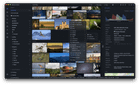
About 6 months ago I posted here about Lap — I couldn't find a good way to browse and manage very large local photo libraries on macOS without cloud lock-in, so I built one myself.
[Features]
Lap is a local-first photo manager focused on speed and simplicity for large collections:
- Local-first by design: your photos stay on your own disk, with no required cloud account or upload.
- No library lock-in: work directly with your existing folders instead of importing everything into a closed database.
- Private AI tools: search, similarity, smart tags, and face features run locally on your machine.
- Built for large collections: optimized for smooth browsing and organization across libraries with 100k+ files.
- Open source and free: no subscription, no forced ecosystem, and code you can inspect.
[Update]
Since that first post, I've been mostly heads-down on new features, user feedback and bug fixes:
- 200+ issues resolved
- 2.3k GitHub stars, 10k+ users
- Latest version: v0.3.2 — core features are now feature-complete and stabilizing
[Feedback]
The basics are solid now, so this is a good point to hear from more people. What's missing, what's confusing, what would make Lap a daily driver for your library? Bug reports and feature requests are both welcome.
[Pricing]
Free and open source
https://github.com/julyx10/lap
[Change log]
https://github.com/julyx10/lap/releases
[AI Disclaimer]
Code completion
https://www.reddit.com/gallery/1wg1nis
Source: r/macapps · by /u/Hot-Butterscotch-396