Hey everyone!
Following up on your feedback and testing, v1.4.0 of the eero Custom Dashboard & Management Suite is officially live on Docker Hub!
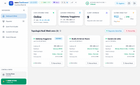
This release brings a complete visual overhaul inspired by Windows 11 Fluent Design, native Pi-hole v6 REST API integration, deep RF signal history, and several homelab optimizations.
Windows 11 Fluent UI Redesign & Collapsible Sidebar (Light Mode)

Windows 11 Fluent UI Redesign (Dark Mode)

What's New in v1.4.0:
- Windows 11 Fluent Design & Dual-Theme Engine: Complete redesign using Fluent UI principles (acrylic surfaces, Segoe UI Variable, dynamic theme-adapting charts). Instant toggle between ☀️ Light, 🌙 Dark, and 💻 System Auto with zero screen flicker.
- Collapsible Sidebar Navigation: Replaced the top tabs with an expandable vertical sidebar (256px ↔ 68px with
localStoragepersistence) featuring quick controls for Gaming Mode and Demo Mode. - Interactive Network Health Diagnostics: Clicking the Health Score badge opens an in-depth modal covering 4 core pillars (Mesh Topology, WAN Gateway ping, Client RSSI, and Band distribution) with actionable recommendations to recover points.
- Multi-Engine DNS Sync & Native Pi-hole v6: Full atomic sync via
/api/config/dns/hostssupporting both passwordless setups and session auth (plus legacy v5 fallback). You can sync bare hostnames without forcing.lanand manage multiple DNS servers simultaneously (e.g. 2 AdGuard Home + 1 Pi-hole). - Port Forwarding & DHCP Lease Fixes: Resolved a FastAPI route collision on
/rules, added recursive extraction for eero resource IDs, and fixed the persistent greenSTATICbadge in the client table. - 99.9% Fewer DNS Queries to eero Cloud: Replaced single-request sessions with persistent HTTP connection pooling (120s keep-alive) and in-memory DNS caching, eliminating local DNS spam and cutting polling cycle latency to ~250ms.
- 1-Click In-App Container Updates: Automated version checking against Docker Hub allowing 1-click self-updating directly through the UI (via Docker socket or Watchtower webhook).
Wi-Fi Signal Quality, Historical RSSI Trends & Weak Signal Watchlist

Multi-Engine DNS Synchronizer (AdGuard Home & Pi-hole)

How to Update / Run:
Upgrading an existing container:
Bash
docker compose pull docker compose up -d --force-recreate (Tip: Remember to do a quick hard-refresh Ctrl+F5 / Cmd+Shift+R in your browser to bust stale caches and load the new Fluent assets!)
Quick-start (Docker run):
Bash
docker run -d \ --name eero-dashboard \ --restart unless-stopped \ -p 8085:8000 \ -v $(pwd)/data:/app/data \ -v /var/run/docker.sock:/var/run/docker.sock \ -e TZ=Europe/Rome \ enricoflammini/eero-dashboard:latest (Mounting /var/run/docker.sock is optional, only needed if you plan to use the 1-click in-app container updater).
- GitHub Repository:https://github.com/EnricoFlammini/Dashboard_EERO
- Docker Hub:https://hub.docker.com/r/enricoflammini/eero-dashboard
- Full Changelog:https://github.com/EnricoFlammini/Dashboard_EERO/blob/main/changelog.md
Feedback, feature requests, and bug reports are always welcome. Let me know how it runs on your mesh!
Source: r/amazoneero · by /u/Alone_Ad4383