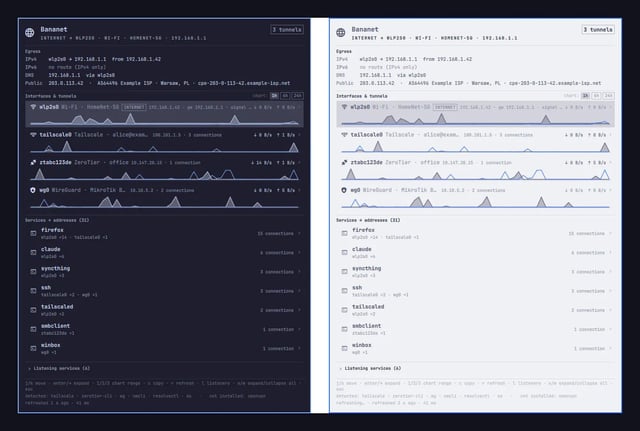
I run Tailscale and ZeroTier side by side, plus WireGuard to a MikroTik at home, and I kept losing track of which link my traffic was really using. So I built a bar widget for Omarchy 4.x that answers that at a glance. It went through the marketplace security review last week and is listed now.
What it shows
- The interface the internet actually leaves through, with gateway, source address and the public IP plus its owner (ISP/ASN, city).
- One row per interface and tunnel: Wi-Fi, Ethernet, Tailscale, ZeroTier, WireGuard (MikroTik Back To Home works), OpenVPN. Live up/down rates, sparklines, and a 1h/6h/24h traffic chart when you expand a row.
- Routes and DNS per link.
- Which processes talk to which remote addresses over which link, and what is listening locally.
- A red DNS line when your default route is a tunnel but name lookups still go to the local router (MagicDNS counts as on-tunnel, so a normal Tailscale setup does not cry wolf).
- A notification and a red bar icon when traffic suddenly falls out of a tunnel.
- Switching the Tailscale exit node from the panel, two clicks with the exact command shown first.
Keyboard driven inside the panel (j/k, Enter, 1/2/3 for chart range, c to copy an address), follows the active Omarchy theme, light and dark.
Privileges
The collector is a plain Python script running as your user, no daemon, no root. Some details need root to read (process names on root-owned sockets, wg show, ZeroTier peers). For those it tries sudo -n and, if that fails, simply shows less and offers a setup card. The card installs a narrow NOPASSWD rule for exactly those read-only commands, generated and validated with visudo on the root side, only when you click it. Nothing touches sudoers on its own. The maintainer review was thorough on this part and made the plugin better, credit where it is due.
Install
omarchy plugin add https://github.com/blazejkapala/omarchy-bananet.git --enable or pick it from the marketplace: https://omarchyplugins.com/plugin.html?id=banan.bananet
Source, README and screenshots: https://github.com/blazejkapala/omarchy-bananet (MIT).
Things I could not do and would love ideas on: per-process byte counts per tunnel. Without nethogs or eBPF I only get connection counts, not bytes per process. If anyone has a lightweight approach that does not need a daemon, I am all ears. Also curious what other tunnel setups people run on Omarchy that I have not covered.
https://i.redd.it/o6o609543ioh1.jpeg
Source: r/omarchy · by /u/greenmediapl