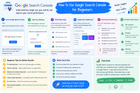
Google Search Console for beginners.
Seeing this asked a lot, so here's the practical breakdown instead of just "go sign up."
Setup (5 min):
- Go to search.google.com/search-console, add your site
- Verify ownership — HTML tag, file upload, DNS record, or auto-verify if you've already got GA4/Tag Manager installed

- Submit your sitemap.xml under the Sitemaps section so Google finds your pages faster
The reports you'll actually use:
Performance report — this is where you'll spend 90% of your time. Shows clicks, impressions, CTR, average position. Filter by query, page, country, device, date range. Best way to see what's actually working and what keywords you're ranking for without even trying to target them.
Coverage/Indexing — shows which pages are indexed and which aren't, plus why. Catches stuff like accidentally blocked pages (robots.txt), duplicate content issues, crawl errors — things that make a page invisible in search no matter how good the content is.
Core Web Vitals — page speed/experience metrics, worth checking regularly since poor scores can hurt rankings especially on mobile.
Mobile Usability — flags mobile-specific issues (text too small, elements too close together, etc).
Links report — shows internal AND external links pointing to your site. Free way to see your backlink profile without paying for Ahrefs/SEMrush.
What I'd actually do with it as a beginner:
- Check Performance weekly, watch for pages losing clicks/impressions over time
- Filter by position 5-15 — these are "easy win" keywords you're already ranking for, just need a small push to hit page one
- Use URL Inspection to request indexing whenever you publish something new
- Check Coverage after any major site change (redesign, CMS migration) — common time for pages to accidentally get de-indexed without anyone noticing until traffic drops
Takes a couple weeks to feel intuitive (impressions vs clicks vs position isn't obvious at first), but it becomes the most reliable source of truth for how your site's actually doing in search since it's real data straight from Google, not an estimate.
Set it up today even before you fully understand every report — having data collecting from day one means real history to look back on once you know what to look for.
Source: r/SEO_Xpert · by /u/Anjalisharmatechi