
Hey Omarchy community! 🚀
If you need to connect to Windows or Linux remote machines via RDP on Omarchy, you know the pain of managing xfreerdp3 across multi-monitor setups, dealing with XWayland tiling misplacements, or lacking a native GUI selector that matches the Omarchy aesthetic.
I built and just released rdp-connect v2.0.0, designed from the ground up to integrate seamlessly with Omarchy's Quickshell shell and Hyprland.
🎨 Native Omarchy & Quickshell Integration
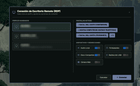
- Quickshell Modal UI: A clean, native QML selector to browse profiles, preview monitor layouts, and toggle peripherals (Audio redirection, Clipboard sync, Shared drive, USB devices, Webcam) on the fly.
- First-Class Compositor Support: Auto-detects and adapts to Hyprland and Niri (supports Niri output names like
DP-2, named workspaces, and native focus/dispatch). - Graceful Fallbacks: If run outside Quickshell, it automatically degrades to
walker,wofi, orrofi. - True Multi-Monitor Spanning on Hyprland: Automatically handles floating and exact coordinate positioning so multi-monitor sessions span your physical displays instead of getting trapped in a single tiled window.
- Hardware-Resilient Matching: Target displays by description substring (e.g.
ASUS,Dell) so monitor ID/port renumbering across reboots won't break your layout. - Zero Bloat: Pure, hardened Bash architecture covered by 260+ automated unit tests (
bats).
⚡ CLI Quick Start & Profile Management
Creating and managing connection profiles is completely scriptable:
1. Create a new profile from template (opens in your $EDITOR)
rdp-connect --new work 2. Edit existing profile anytime
rdp-connect --edit work 3. Inject all optional tunables & comments into existing profiles
rdp-connect --update-profiles 4. Connect directly via CLI (with optional on-the-fly overrides)
rdp-connect work --span --no-audio Profile Template (~/.config/rdp/profiles/work.env)
HOST="192.168.1.100" USER_RDP="myuser" PASS_RDP="mypassword" DOMAIN="" # Optional settings (precedence: CLI flag > profile > UI toggle) # MONITOR_MODE="span" # single | span | multi # MONITOR_ORDER="ASUS,0" # Monitor description substrings or numeric IDs # AUDIO_REDIRECT=1 # 1=client speakers, 0=remote speakers # CLIPBOARD_SYNC=1 # 1=enable bidirectional clipboard # DRIVE_REDIRECT=1 # 1=share local ~/Compartido folder # USB_REDIRECT=0 # 1=redirect USB devices ────── ### ⌨️ Keybindings for Omarchy (~/.config/hypr/bindings.lua or hyprland.conf) ⌨️ Keybindings
For Hyprland (~/.config/hypr/bindings.lua or hyprland.conf):
— Open the native Quickshell RDP selector
o.bind("SUPER", "R", "exec", "rdp-connect") — Direct one-click connection to your primary work profile
o.bind("SUPER_SHIFT", "R", "exec", "rdp-connect work") — Dynamically re-span an already running session across all screens
o.bind("SUPER", "E", "exec", "rdp-connect --expand work") (Or standard bind = $mainMod, R, exec, rdp-connect in hyprland.conf)
For Niri (~/.config/niri/config.kdl):
binds { // Open selector Mod+R { spawn "rdp-connect"; } // Direct connection Mod+Shift+R { spawn "rdp-connect" "work"; } } ──────
📦 Installation
Available on the AUR:
Using Omarchy pkg manager:
omarchy pkg aur add rdp-connect Or using paru / yay:
paru -S rdp-connect or
yay -S rdp-connect Or via the standalone installer:
curl -sSL https://raw.githubusercontent.com/hbuddenberg/rdp-connect/main/install.sh | bash
──────
🔗 GitHub: https://github.com/hbuddenberg/rdp-connect
📦 AUR Package: https://aur.archlinux.org/packages/rdp-connect
Would love to hear your feedback, issues, and ideas from the Omarchy community!
Source: r/omarchy · by /u/hbuddenberg