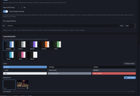
Every VRChat chatbox tool I could find is Windows-only, so I wrote one for Linux. It's grown a fair bit since — **OSC-DreamChatbox**, PyQt6, GPL-3.0, on the AUR.
**Video:** https://www.youtube.com/watch?v=XJFplUvuGVs
**Repo:** https://github.com/yakuda-stack/OSC-DreamChatbox
It puts stuff in the VRChat chatbox over OSC: a rotating personal status, what you're currently playing, live hardware stats, speech-to-text with translation, and a plugin system.
The Linux-relevant bits:
* **Now playing** reads MPRIS over D-Bus, so it works with any player — Spotify, VLC, Firefox, whatever's on the bus.
* **Hardware stats** come from `/proc` and `/sys` directly, plus `nvidia-smi` on NVIDIA. GPU/CPU power draw in watts from amdgpu's hwmon node and zenpower/RAPL.
* **FPS** via MangoHud's log output — the card tells you which launch options to add.
* **Native OSCQuery**: dynamic port + mDNS/Zeroconf, discovers the running VRChat instance instead of hardcoding 9000/9001. Fewer port fights with OSCLeash, face tracking, and friends. There's also a one-button fix that flips OSCQuery on in other tools' config files.
* **Speech-to-text with fully offline translation** if you run LibreTranslate — the app can start and stop the local server for you from the UI.
* **Hotkey blocks** use xdotool / wtype / ydotool for sending and python-evdev for watching, so Wayland is covered.
* Config in `~/.config/OSC-DreamChatbox`, packaged as an AUR package and an AppImage.
Windows support exists too (same codebase, platform backends behind one switch in `core/osinfo.py`), but Linux is the reason it exists.
`yay -S osc-dreamchatbox`, or there's a one-line install script for other distros.
Feedback and bug reports very welcome — it's a solo project.
https://www.reddit.com/gallery/1vpdwzm
Source: r/virtualreality_linux · by /u/Strict-Tie-7521