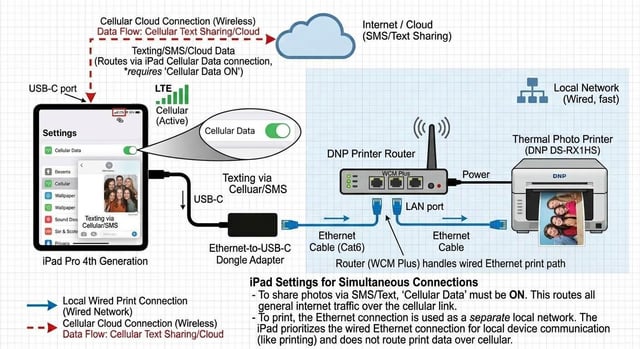
When guests step up to a photo booth at a high-end wedding, corporate gala, or brand activation, they expect two things: flawless instant prints in their hands, and immediate text delivery to their phones.
Behind the scenes, pulling this off without relying on venue Wi-Fi is one of the trickiest technical challenges in event production. When you wire an iPad directly to a dye-sub printer network, iOS defaults all traffic to that wire—silently queuing SMS and emails until the event ends.
Here is how we configure our attended setups to run reliable, zero-latency wired printing while keeping high-speed cellular data live for real-time guest sharing.
The Dual-Channel Hardware Link
- Printer: DNP DS-RX1HS connected via USB-B to USB-A into a DNP WCM Plus.
- Wired Interface: Cat6 Ethernet from the WCM LAN port into a powered USB-C Ethernet adapter driving the iPad Pro.
- Data Route: Dedicated cellular data active on the iPad for outbound guest texts/emails.
The Network Hack: Blank Gateway Routing To prevent iOS from searching for an internet route through the print server, we isolate the wired subnet entirely by removing the gateway:
- Connect the adapter and open Settings > Ethernet > [Your Adapter].
- Turn Limit IP Address Tracking to OFF (prevents Apple from routing local calls through external proxy servers).
- Set Configure IP to Manual.
- IP Address:
192.168.5.55(Matches the WCM wired subnet on 192.168.5.x). - Subnet Mask:
255.255.255.0. - Router (Gateway): LEAVE COMPLETELY BLANK.
- DNS: LEAVE COMPLETELY BLANK.
Because the Gateway and DNS fields are empty, iOS immediately knows the wired connection cannot route to the web. It sends all local print jobs directly through the wire to the DNP, while instantly pushing all Fiesta digital shares over 5G.
Event Setup & Boot Order
- Power: Turn on the DNP printer first, power up the WCM Plus, and wait 60 seconds until status lights turn solid green.
- Toggles: Turn the iPad's Wi-Fi OFF and Cellular Data ON.
- Connect: Plug the USB-C adapter into the iPad.
- Run Test: Open Fiesta, select the DNP print station, and trigger a test capture. Prints land in seconds; texts deliver immediately.
Why We Build It This Way We believe an attended photo booth experience shouldn't depend on unpredictable venue Wi-Fi or laggy sharing queues. Whether you're an event professional setting up your own rig or an event host planning a celebration across Long Island and New York City, reliability is everything.
Have questions about subnet routing or Fiesta print profiles? Drop them in the comments.
Planning an upcoming event? Send a direct message or visit our website to check availability for full-service, attended photo booth experiences.
https://i.redd.it/c7tqk7d15soh1.jpeg
Source: r/u/Mousscreations · by /u/Mousscreations