Two months ago I shared Network Tools AI here and got a lot of useful feedback from this community.
Since then I’ve kept building — but one piece of feedback changed the direction more than I expected:
Don’t just show technical numbers. Explain what they mean.
That pushed the app beyond being just a collection of network utilities.
A — Answer: What does it solve?
Most networking apps on iPhone still focus on one specific task:
• Wi-Fi analysis
• LAN scanning
• Ping & Traceroute
• DNS / WHOIS
• Network monitoring
• SSL monitoring
• Device diagnostics
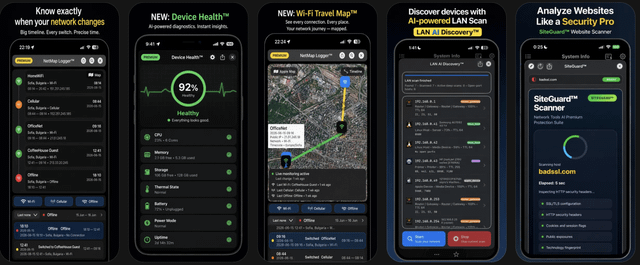
I wanted these tools to work together in one native iOS app — with shared monitoring, history and diagnostics.
Today Network Tools AI includes:
Network Diagnostics
• Wi-Fi Analyzer
• LAN AI Discovery™
• Ping & Traceroute
• DNS tools
• WHOIS & IP lookup
• Port Scanner
• Network Monitor
Network History
• NetMap Logger™
• Wi-Fi / Cellular / Offline transition history
• Interactive map & timeline
• Search and filters
• CSV / XLSX / TXT exports
Security & Privacy
• SSLGuard™
• DomainGuard™
• SiteGuard™
• Secure Browser with AdBlock and optional private proxy routing
Device Monitoring
• Live Activities
• Apple Watch support
• Background network monitoring
• System Info
And the biggest change:
Device Health™
Instead of only exposing CPU, memory, storage, battery and thermal numbers, Device Health tries to answer a much simpler question:
“Is my iPhone actually healthy right now?”
It analyzes the current device state on-device and gives a simple health assessment while still letting technical users inspect the underlying data.
I also added Device Health Alerts, so the app can notify you about things like sustained CPU load, thermal changes, low storage, battery conditions or significant health-score changes.
The processing stays private and on-device.
B — Better: What changed after the feedback?
Originally I thought of Network Tools AI primarily as a toolbox for network engineers.
I’m increasingly designing it for two different users:
Technical users who want the actual data.
and
Everyone else who mostly wants to know:
“Is something wrong, and what should I look at?”
So rather than removing the technical detail, I’m trying to put an understandable layer on top of it.
That philosophy is now influencing LAN discovery, device identification, network monitoring and Device Health.
The goal is becoming:
Show the data when I need it. Explain the data when I don’t.
C — Cost
The app is freemium, and many of the everyday networking tools are free.
There is also a Lifetime Premium one-time purchase for advanced features such as NetMap Logger, history, timeline, filtering, exports and premium functionality.
Continuous services such as SSL/domain monitoring and private proxy infrastructure are available separately through the Network Security Pack subscription.
I deliberately want to keep the core networking toolkit useful without requiring a subscription.
App Store:
https://apps.apple.com/app/network-tools-ai/id6444090484
I’m the developer, so criticism is genuinely useful.
For people who aren’t network engineers: when an app tells you CPU usage, memory pressure, thermal state, network changes, etc. — do you actually want the raw numbers, or would you rather it tell you what changed, whether it matters, and what you should do about it?
https://i.redd.it/x44i925w2xnh1.png
Source: r/iosapps · by /u/ivo_stefanoff