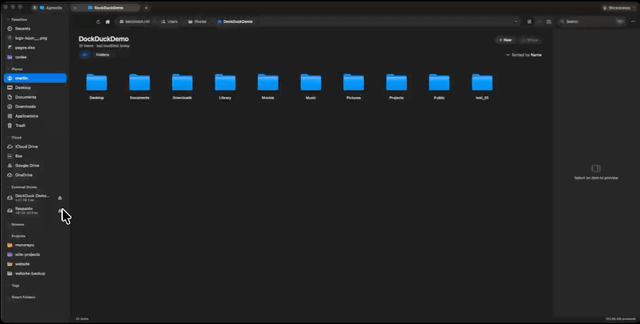
Hi r/macapps, developer of DockDuck here.
I move files around all day and Finder always felt like it was built for someone who doesn't. The alternatives that do have the power mostly look like they stopped getting design attention a decade ago. So I spent the last year building the middle that I couldn't buy: Finder's feel, without Finder's ceiling. Native AppKit/SwiftUI, no web views anywhere.
Workspaces just shipped this week, so it felt like the right moment to finally post here.
Problem:
The moment you need two folders side by side, a rename across 40 files, a server connection, or to grab that file you copied three folders ago, Finder sends you to extra windows, extra apps, or the terminal. I wanted all of that in one place that still feels like macOS.
Browsing:
- Icons, List and Columns views, configurable list columns, one-click filter chips (Images, Documents, Code, Videos…).
- Tabs with session restore, pinned tabs, and named Workspaces: save a window's whole tab set ("Client X", "Video project") and reopen the layout later.
- Dual pane on a real AppKit split view (the divider drag is buttery, that took embarrassingly long to get right), plus a folder comparison mode that visually links matching files between both sides: same name, different size or date. Syncing two folders by hand stops being guesswork.
- ⌘K switcher that searches every open tab across every window.
- A Home dashboard: drives with free space, pinned items, recent activity, your servers.
- Preview panel, Quick Look, and a Get Info window with overview, permissions and activity tabs.
The address bar does something I haven't seen elsewhere: type claude, terminal or git into it and it opens a terminal right there in that folder running that thing. Type code and the folder opens in VS Code. Small feature, weirdly addictive.
Doing things to files:
- Batch rename: find & replace, add text, numbering, case. Live preview, and the whole batch undoes as one step.
- Organize into folders: pick a rule (kind, extension, year, first letter) and a messy Downloads sorts itself into subfolders. Also one undo.
- Archives with zero bundled binaries: creates zip, 7z, tar.gz, tar.xz, extracts those plus RAR. Everything through what macOS already ships.
- Quick Actions in the context menu: convert images (PNG/JPEG/HEIC/TIFF), resize to presets, combine PDFs.
- The Shelf: drag files onto a floating tray, navigate anywhere, drop the batch or "Move here" in one go.
- Real transfer progress with a live throughput graph, undo/redo on file operations, and Finder-style prompts for locked files instead of silent failures.
- Trash across all volumes in one view, with Put Back.
- Finder tags: read, write, browse by tag. Everything stays visible in Finder and Spotlight.
- On macOS 26 it reads and writes the new emoji/symbol folder customizations, including on releases where Finder's APIs don't expose them to third-party apps.
Search:
Spotlight-backed, filename or full content, extension chips, tag/date/size filters. Any search saves as a Smart Folder that re-runs live from the sidebar.
Beyond the local disk:
- Servers: SFTP, FTP/FTPS, SMB, WebDAV. Browsable like local folders, credentials in the Keychain, host keys and certificates handled properly.
- Cloud drives as first-class citizens: iCloud Drive (with the merged app-containers view Finder shows), Dropbox, Google Drive, OneDrive, Box. Sync-status badges, download on demand, "Remove Download" to free space. DockDuck never talks to a cloud API and never sees your cloud login. It reads the filesystem and the provider's own app keeps owning sync.
For developers (all off by default): git status badges on files and folders, open-in for Terminal, iTerm2, Warp, Ghostty and your editor.
The native part:
Every shortcut is rebindable from one command registry, the toolbar is customizable, there's an optional menu bar item and a global hotkey that reveals your latest download. Light/dark, your accent color, SF Symbols, system materials. 14 languages. Listings, icons and thumbnails render on the first frame from cache and upgrade in place. No spinners for opening a folder.
Comparison:
- Finder: honestly fine until it isn't. No dual pane, no batch rename, no servers, silent failures on locked files. If you're happy in Finder, stay, it's free. DockDuck is for the day you catch yourself with three Finder windows and a terminal open for one job.
- ForkLift: the closest established comparison, and strong at transfers. My bet is tighter native polish plus the workflow layer: workspaces, the shelf, folder comparison, smart folders.
- Path Finder: the veteran, huge feature list, showing its age in density and performance. I deliberately ship fewer, deeper features that don't need a manual.
- Marta: fast, keyboard-driven, free. If you want an orthodox commander configured in text files, it's genuinely great. DockDuck is for people who want the power with zero configuration.
- QSpace Pro / Commander One: capable and fairly priced, both leaning utilitarian in design. My whole thesis is that this category can be powerful and still look like Apple shipped it.
- Bloom: newest entrant, genuinely nice, we clearly diagnosed Finder the same way. DockDuck goes further beyond the local disk (servers, cloud drives, folder comparison, cross-volume trash, git badges) and ships in 14 languages. If your files live on one Mac, try both. If they live everywhere, I cover more of your day.
Privacy:
Your files never leave your Mac. No telemetry on your files, zero cloud credentials held, remote connections go straight to your servers. You sign in once to start the trial or activate the license (no key to type) and that's it.
Pricing:
- $49 one-time (Pro Lifetime) or $24.99/year with manual renewal. It never auto-charges, it just expires and asks.
- Both cover 3 Macs.
- 14-day full trial, no card, and a 14-day money-back guarantee.
- macOS 15+ (Sequoia), Apple Silicon and Intel (universal binary).
AI disclosure:
No AI features in the app, nothing leaves your Mac. Development is AI-assisted (pair programming and code review); every feature is designed, tested and shipped by me.
Transparency:
I'm Martin, solo developer behind DockDuck (Heylel Labs).
- Website: https://dockduck.app
- LinkedIn: https://www.linkedin.com/in/martin-ochoa-9a521291
- Privacy Policy: https://dockduck.app/privacy
- Terms: https://dockduck.app/terms
I'll be around in the comments. Ask me anything: architecture, why no Electron, how the cloud support works without touching a cloud API, or what should come next. The shelf and workspaces both exist because of watching how people actually move files, so feedback here genuinely lands on the roadmap.
https://v.redd.it/3b9slokm9tnh1
Source: r/macapps · by /u/mnemosinee21