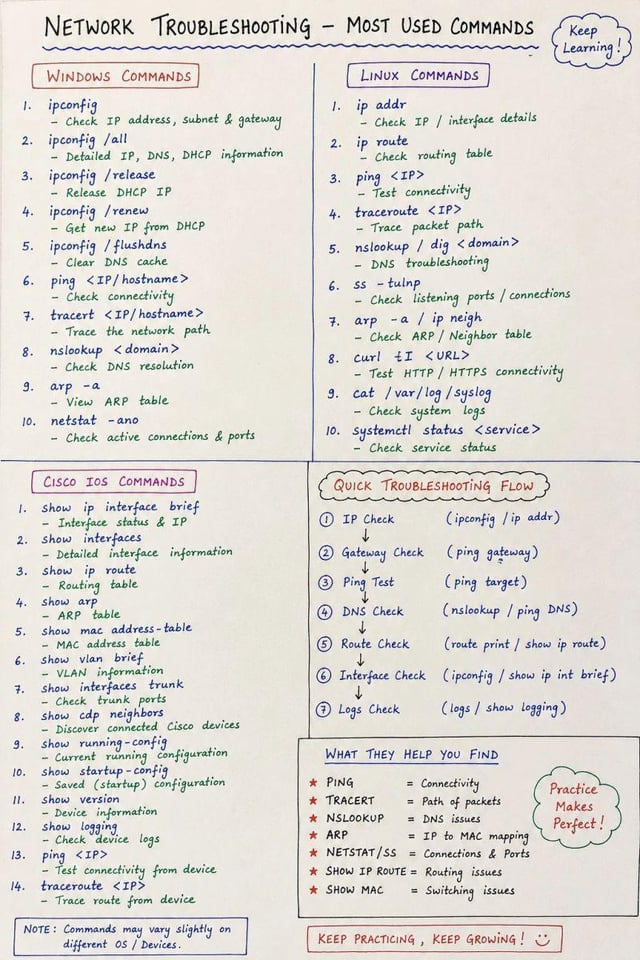
When a network issue comes up, these are usually the first commands I reach for.
Windows
ipconfig /all — IP, DNS, DHCP info
ipconfig /flushdns — Clear DNS cache
tracert <IP> — Trace the route
netstat -ano — Connections, ports, PIDs
Linux
ip addr — Interfaces and addresses
ss -tulpn — Listening ports/services
dig <domain> — DNS checks
curl -I <URL> — Quick HTTP response check
Cisco
show ip interface brief — Interface status
show ip route — Routing table
show mac address-table — MAC addresses
show cdp neighbors — Connected Cisco devices
For a basic issue, I normally go:
IP → gateway → target → DNS → route → interface → logs
Nothing fancy, but it saves a lot of time when you're staring at a machine wondering why nothing works.
What command do you use the most?
Discord if anyone wants to hang out: https://discord.com/invite/RTZyZXATE
https://i.redd.it/7dver9cewjnh1.jpeg
Source: r/learnwithcodelivly · by /u/codelivly