TL;DR: Start with three public tools: scanner → threat context → decoder. They can give you a useful first layer of evidence about what is exposed and what looks suspicious.
Just keep the boundaries clear: suspicious does not automatically mean malicious, an attack attempt does not prove compromise, and a clean outside-in scan does not prove the server is clean.
A recurring pattern in WordPress incident discussions looks something like this:
A site is cleaned. Passwords are rotated. WordPress core is refreshed. Plugins are updated.
Then the injected code comes back.
Or an unfamiliar PHP file appears. An unexpected administrator is created. Search visitors see something the site owner cannot reproduce. Logs fill with SQL-injection probes, but nobody knows whether anything actually succeeded.
These situations have one thing in common:
The evidence is coming from different layers.
Website malware does not have to live where its symptoms appear.
A useful investigation therefore separates into four questions:
- What can a visitor, browser, or crawler reach?
- Does any of that content behave suspiciously?
- What exists or has changed inside the server and WordPress environment?
- Does the condition return or change over time?
You do not need to deploy a full security platform to start answering the first two.
1. Start outside-in
Run the domain through Quttera's Website Malware Scanner.
The goal at this stage is not to prove the website is clean. It is to see what the public side of the website is actually exposing.
Look beyond the overall result and examine the resources discovered during the scan: pages, JavaScript, redirects, iframes, external domains, and other retrieved content.
Things worth investigating include:
- injected or obfuscated scripts
- unexpected redirects
- hidden iframes
- SEO spam
- phishing content
- unfamiliar third-party resources
- blacklist or reputation issues
Two rules matter here.
“Suspicious” is a lead, not a conviction.
Legitimate code can contain redirects, encoding, minification, or other behavior that looks unusual to a heuristic engine. Investigate why something was classified before deleting it.
And:
A clean outside-in result describes the content the scanner could reach under those conditions. It does not prove the WordPress installation or hosting environment is clean.
Authenticated areas, unlinked content, conditional behavior, database state, and server-side persistence may require a different layer of investigation.
If any security scan cannot complete, treat that as unknown or incomplete coverage — not as evidence that no problem exists.
2. Follow the detection instead of stopping at the verdict
When the scanner identifies a suspicious or malicious resource, open the detailed finding.
A scan result can provide several pieces of evidence:
- the affected page or resource
- the threat name
- the reason for detection
- the classification
- a threat dump containing content associated with the finding
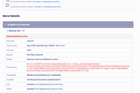
Example scan finding showing the affected resource, threat name, detection reason, and threat dump.

In this example, the scanner classified /news/# as malicious and reported:
Heur.HTML.SpamSEO.gen.1E84CB
with the reason:
SEO/Spam detected
The report also exposes a threat dump, giving the analyst content associated with the detection rather than only a top-line verdict.
Next to the threat name is “What's this?”.
Clicking that link takes the user into the Quttera Threat Encyclopedia, where the detection or its broader threat family can be investigated further.
For this example, the related family is Heur.HTML.SpamSEO.gen.

Now the finding has context beyond a malware label.
The analyst can review information such as:
- what the detection represents
- how the technique works
- potential impact
- mitigation considerations
- technical indicators
- related categories and tags
In this example, the threat family describes behavior involving hidden or keyword-stuffed links, off-screen CSS techniques, and cloaking logic that may present different content to search engines and normal visitors.
That matters during an investigation.
A site owner may report:
“The website looks completely normal when viewed directly.”
That does not necessarily contradict the detection.
Conditional malware can change its response depending on factors such as the user agent, request path, visitor type, referrer, cookies, or other conditions.
Go one level deeper when more context is needed
The Threat Encyclopedia also provides optional AI-Powered Threat Intelligence analysis.

This can extend the initial threat-family information with additional analysis such as:
- correlation analysis
- IOC extraction
- detection patterns
- defense recommendations
Treat this as enrichment, not a replacement for incident validation.
AI-assisted analysis can help an analyst generate hypotheses and identify indicators worth checking, but those findings should still be correlated with the actual website, server files, access logs, WordPress users, database activity, and other available evidence.
The distinction is important:
Detection tells you what looked abnormal.
Threat intelligence helps explain what that abnormality may represent.
Incident investigation determines what actually happened on the site.
That is where detection becomes investigation.
It also helps avoid one of the easiest mistakes during malware cleanup:
deleting something simply because you don't recognize it.
An unusual resource may be legitimate, outdated, vulnerable, modified, or malicious. Context helps determine which.
3. Deobfuscate when the code itself is hiding the answer
If you have an obfuscated PHP or JavaScript snippet from a scan report, site files, or other incident evidence, Malware Decoder can help make the code readable.

The value is not simply making the code easier to read.
Deobfuscation may expose:
- remote URLs
- redirect conditions
- network requests
- encoded strings
- downloaded content
- concealed execution logic
Those artifacts can then be correlated with the rest of the incident evidence.
Decoded output should still be treated as an investigative artifact, not a verdict.
The analyst still needs to determine where the code came from, whether it executed, what called it, what it communicated with, and whether another mechanism can recreate it.
Do not submit credentials, API keys, configuration secrets, customer information, or proprietary source code to any public analysis service.
Reduce the sample to the smallest relevant fragment first.
Where evidence is often misread
An attack attempt is not the same as a successful compromise.
If access or WAF logs contain thousands of SQL-injection requests, that is evidence that SQL injection was attempted.
It does not by itself establish that SQL injection succeeded.
To establish impact, look for a consequence: an unexpected database change, a newly written file, a created administrator, an executed payload, a redirect, an altered configuration, or another observable side effect.
This distinction becomes especially important when managing many WordPress sites.
High alert volume is not the same thing as high compromise volume.
The more useful operational question is:
Which events actually changed something that matters?
Likewise:
Removing the visible malware is not the same as removing persistence.
If an injected script returns after cleanup, that script may only be the symptom.
The mechanism restoring it could be elsewhere:
- another server-side file
- a scheduled task
- a must-use plugin
- database content
- a compromised administrator account
- stolen hosting credentials
- a vulnerable plugin or theme
- an override such as .user.ini
- something higher in the hosting environment
That is why repeatedly deleting the same malicious file can become a loop.
The question eventually changes from:
“Where is the malicious file?”
to:
“What keeps recreating it?”
Where the free workflow stops
These three public tools are useful for moving from:
“Something looks wrong.”
to:
“Here is what is exposed, here is what looks abnormal, and here is the next layer that needs investigation.”
For a first-pass investigation, that can already provide useful evidence.
The limits become clearer when the problem changes.
If an infection keeps returning, or server-side file visibility, integrity monitoring, and change-over-time detection are required rather than another snapshot, that is where ThreatSign becomes relevant.
If the same checks need to run automatically across many websites, or structured website-security findings need to feed another platform or security workflow, the Quttera API becomes the more relevant layer.
Different jobs, different tools.
No single scanner answers every security question.
A useful layered investigation is not about collecting the largest possible number of alerts.
It is about knowing exactly what each piece of evidence proves, what it doesn't, and which layer to examine next.
For anyone who has dealt with a WordPress reinfection: what clue finally pointed you toward the actual persistence layer?
Source: r/u/quttera-ltd · by /u/quttera-ltd