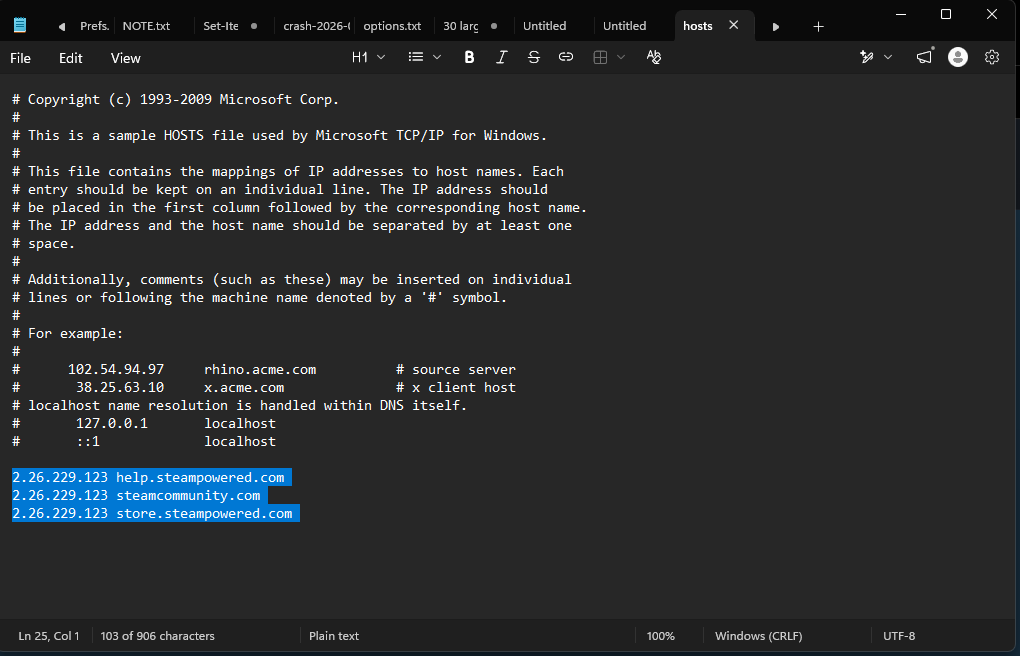
The filepath is C:\Windows\System32\drivers\etc\hosts
I recently ran some code into cmd that was used to verify my computer didn't contain any cheating software for used for cs2 (faceit verification). The code was originally blocked so I disabled firewall & real-time protection, shortly turning it back on after I could successfully run the anti-cheat verification.
Afterwards I was locked out of steam servers for suspicious activity related to my account after running this code & I wasn't too worried as the steam pop-up ensured that my account will return back to normal very shortly. A few days later I was no longer getting that pop-up, instead my steam simply wouldn't load & I was greeted with Error Code: -102 (no internet connection) whenever I tried loading any steam-related webpage both on the steam client & web browser.
I originally tried using the forbidden artificial intelligence robot to help me with my issue & it thankfully pointed me to the root cause of the issue (shown in the image above). There are 3 lines of code in a system file labeled "hosts" that is found under C:\Windows\System32\drivers\etc\hosts which is causing any steam-related web page to redirect to another ip from what i understand
The obvious answer and the solution that chatgpt would continuously give me is just "Delete those 3 lines and press ctrl + s" but instead over overwriting the system file, ctrl + s would act more like the "Save as" feature where it wanted me to save this completely new text document somewhere in my computer. I dont want to risk saving a completely new text document in my System32 folder, especially because the original file is considered a "system file" and not a .txt.
If anyone has a solution to this issue I would greatly appreciate it as it's been killing me for the past 2 weeks & I'm considering just doing a hard reset on my computer atp
https://i.redd.it/43ze81u6o0nh1.png
Source: r/computerhelp · by /u/itzvesgo