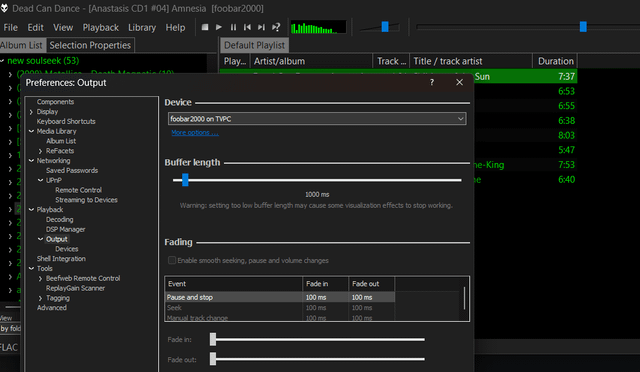
TL;DR: After an entire day of troubleshooting and head banging against the wall, the solution was a combination of installing Windows Media Player Legacy (to enable the Windows Media Player Network Sharing Service) and letting the network discovery services settle. The renderer (headless PC) suddenly appeared as an output device in foobar2000 on my main PC. Here's the full story and step-by-step guide.
I wanted to stream lossless audio from my main Windows 11 PC (connected via Ethernet) to a headless Windows 10 PC (connected via Wi-Fi) over my home network. The headless PC is connected to 5.1 hifi system with toslink, and I wanted to control playback from my main PC using foobar2000's native output device selection.
I tried everything, and I mean everything…before it finally worked:
The standard UPnP approach (didn't work)
Enabled UPnP Remote Control in foobar2000 (Preferences > Networking > UPnP Remote Control) on the headless PC. both PCs already were on private network profiles.
Added foobar2000 to Windows Firewall as an allowed app (both Private and Public).
Set SSDP Discovery and UPnP Device Host services to Automatic and started them. Restarted both PCs multiple times. The headless PC never appeared as an output device on my main PC.
Firewall deep dive (didn't help). Tried disabling the firewall entirely on both PCs, that didn't matter at all.
The windows services:
Enabled function discovery resource publication and function discovery provider host.
Made sure DNS Client and Network Discovery were both enabled. still no change.
Tried Beefweb it works but I didn't like it. I like to just work with my already existing library on my main pc.
BubbleUPnP (partial progress, but flawed) Installed BubbleUPnP Server to create an OpenHome renderer.
The headless PC showed up as an output device, but nothing played.
Tried using the BubbleUPnP Android app as a controller, it worked, but the app was slow and clunky full of ads and tracking cookies, required using my phone as a middleman, which defeated the purpose of a direct PC-to-PC solution…functional but not a good experience.
Feeling frustrated, I decided to try enabling Windows Media Player Legacy and Media Streaming on both PCs, thinking it might help with network discovery. After installing it and toggling media sharing on/off, I restarted both PCs, opened foobar2000 on my main PC… and the headless PC suddenly appeared as an output device and played audio flawlessly.
So I've been reading people having trouble with this setup on forums, and it really is no wonder when there is so many steps where things can go wrong, and it requires deep dive into services and hidden non-existant options on windows 11 legacy. Mind you this was a fresh install of latest x64 bit version with nothing added, it should just work, but windows networking is a strange wild bird that needs to be tamed into submission.
since the other TVpc will be "headless" most of the time I made a batch file to shut it down remotely (shutdown /m \\TVPC /s /f /t 5) and restart (shutdown /m \\TVPC /r /f /t 5) but also for that I had to go deepdiving into registry and editing options in windows networking most users even don't know about and that's another story for another day.
https://i.redd.it/sg28p433eymh1.png
Source: r/foobar2000 · by /u/noLif3rs4life