Hey, this is a reaction to this video: https://www.youtube.com/watch?v=oeqUHEp4sYM
Where Linus said, you can only tell TVs to use your DNS servers, and some TVs might ignore the DHCP setting. There's a quite easy way to enforce the use of your DNS with proper router configuration:
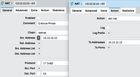
- Grab all traffic on port 53 – this port is reserved for DNS traffic
- Check if the source IP is not your DNS server (because you still need a working upstream)
- Forward all traffic that matched these rules to your DNS servers
- On your DNS, block domains for DNS over HTTPS and DNS over TLS
This work, because the DNS protocol doesn't mind if the reply came from a different IP than it was sent to. I'm including a screenshot from my MikroTik router with this NAT rule. You have to set two rules, one for UDP and one for TCP.

Source: r/LinusTechTips · by /u/Pols043