Hey Guys, I’m Stefan, the developer of Trellis.
in the past I had to have a lot of finder windows and tabs open to manage my work.
And it was just a pain to have to switch back and forth.
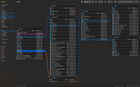
Trellis is a macOS file manager that lays folders out as panes on a canvas. Open a
subfolder and it appears next to its parent, joined by a line. Nothing you already
opened disappears, so you can see the path you took, and moving files between two
folders is a drag instead of copy, switch tab, paste.
Two things set it apart from the usual "graph view" apps:
- One pane per folder, not one node per file.** A folder with 87,000 entries is a rectangle with a scroll bar, not 87,000 nodes that blow up the layout.
- It keeps its own index.** Opening scans nothing, panes render straight out of SQLite, and FSEvents reports what changed since last launch. Folder sizes are there immediately instead of after thirty seconds of counting.
Layout:
- Tree to the right for deep paths, tree downwards for wide fan-out, star with the roots in the middle. Switching animates, panes keep their lines attached.
- Drag any pane anywhere. The ones you did not touch keep arranging themselves.
- Optional colour per branch, inherited downwards like a mind map.
- Rows whose subfolder is open dock to the top of the pane when you scroll past them, so the way back stays one click away.
Files:
- Select across folder boundaries with cmd-click, then copy, move, rename or group in one go. Finder cannot do this because it only ever shows one folder.
- Compare two folders: green for what exists on one side only, orange for same name but different content. Computed from the index, without reading a single file.
- Find duplicates by checksum, cached in the index, so the second pass is nearly free.
- Batch rename with search and replace, numbering and dates, with a preview before it runs, across folders.
- Compress and expand, and look inside a zip without unpacking it.
- Trash with put back, and undo on file operations.
Finding things:
- A search can stay on the canvas as its own pane, next to the folders.
- Its own index, plus Spotlight if you want results from outside your opened roots.
- Per pane: a filter (File Type or write what you want to filter), and a view mode of list, grid or sorted by size.
Fits the rest of the system:
- Quick Look, Finder tags, Quick Actions, share sheet, reveal in Finder, open in your terminal or editor.
- Saved workspaces, tabs, multiple windows.
Privacy and price:
- Sandboxed. No account, no telemetry, nothing leaves the machine. The index is a file on your Mac, and the app only ever sees the folders you hand it.
- Not on the App Store yet, but free to try via TestFlight: https://testflight.apple.com/join/qsF8Ygd2
- At release: $14.99 once, no subscription. 14 days fully usable, after that everything stays readable and only writing to disk waits for the unlock.
Happy to answer questions, and I would genuinely like to hear where it breaks for you.
https://www.reddit.com/gallery/1vyc2zx
Source: r/MacStack · by /u/Meannekes