Hey Reddit! 👋
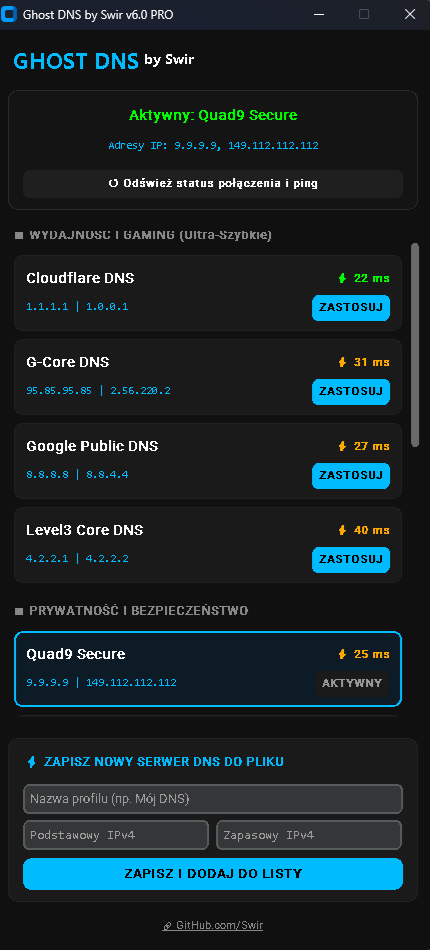
I wanted to share a desktop app I've been working on called Ghost DNS (v6.0 APEX).
I was tired of digging through Windows network adapter settings every time I wanted to switch my DNS for gaming (lower latency) or casual browsing (ad-blocking). So, I built a tool to make it a one-click process.
What it does:
- 🎮 One-Click Presets: Instantly switch to ultra-fast servers (Cloudflare, G-Core) for gaming, or secure servers (AdGuard, Quad9, Mullvad) to block ads and trackers at the network level.
- ⚡ Live Ping Tester: It automatically pings the DNS servers and shows you the actual response time (ms) so you can pick the fastest one for your connection.
- 💾 Custom JSON Database: You can add your own custom DNS IP addresses directly in the app, and it saves them locally to a
custom_dns.jsonfile. - 🔄 Smart Detection: It auto-detects your active network adapter and shows your current DNS configuration. (There's also a 1-click button to revert to your router's default DHCP settings).
How I built it:
- Written entirely in Python.
- The dark-mode UI is built using the awesome CustomTkinter library.
- Under the hood, it uses native Windows
netshandipconfigcommands (so it does require running as Administrator).
Check it out here: 🔗 GitHub repository
To run it from source, you only need to run pip install customtkinter.
I’d love to hear your feedback, code reviews, or any feature suggestions you might have. Let me know what you think! 🍻
https://i.redd.it/emrs3x6530lh1.png
Source: r/PythonProjects2 · by /u/SWIRJESTEM