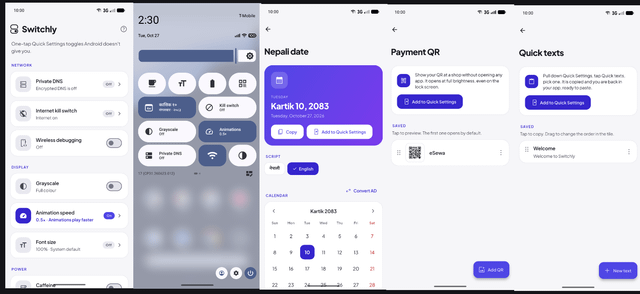
Here's why I built Switchly.
How many times have you unlocked your phone, opened an app, navigated through menus, and tapped around just to do something that should take one second?
I thought there had to be a better way.
So I built an app that turns Android's Quick Settings panel (the one you pull down from the top of your screen) into a personal toolbox.
Here's what you can do with it:
Living in Nepal?
• See today's Bikram Sambat date without opening a calendar app.
• Keep the Nepali calendar just one swipe away.
For everyone else, too:
• Payment QR: Save your QR codes and display them full-screen at maximum brightness.
• Quick Texts: Copy frequently used addresses, account numbers, or messages with one tap.
• Private DNS: Switch between supported DNS providers for different privacy and filtering needs.
• Internet Kill Switch: Block internet access for selected apps while allowing others to connect.
• Font Size: Make text easier to read without digging through settings.
• Animation Speed: Make supported system transitions feel faster.
And that's just the beginning.
There's also grayscale mode, a screen-awake toggle, wireless debugging shortcuts, profile-based setups, public mode and more.
Built with Flutter + Kotlin, because sometimes building a better Android experience means going beyond Flutter alone.
And I made it free and open source.
Download Link: https://github.com/4bhisheksharma/switchly/releases/latest
Github Link: https://github.com/4bhisheksharma/switchly
If you're in Nepal, I'd love to hear which feature you'd use most. If you're anywhere else in the world, I'd love to know which shortcut would make your daily phone use easier.
https://i.redd.it/nz9xo93454zh1.png
Source: r/technepal · by /u/syman_024