Problem
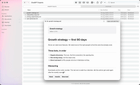
I posted MD Flow here five weeks ago. The top comment was not about my app, it was whether Quick Look is extendable, now I am happy to say that it is.
Press space on a .md file in Finder and you get the rendered document instead of raw hashes and asterisks. Headings, tables, code highlighting, callouts, KaTeX math. It is in the free tier.
No Mermaid in the preview, because 2.5MB of JavaScript in an extension the system kills for being slow is a bad trade, so diagrams fall back to highlighted code. Wikilinks do resolve inside the app now, which was the gap pointed out last time. [[Note]] finds the file by name, nearest folder first.
Comparison
QLMarkdown and Glance are free, open source, and better at the Quick Look half than I am going to be. If a rendered spacebar preview is the whole of what you want, install one of those.
What they do not do is the folder. MD Flow is a reader with the tree on the left and the rendered file on the right. Connect a folder once, arrow through everything in it, search inside the files.
Marked 2 ($13.99) is still the better buy if you work on one document at a time with an editor open beside it. It is document-first and Mac only. Obsidian is free and far more powerful if you live in a vault. MD Flow opens any folder with no vault and no plugins, and it never writes to your files unless you rename or trash something yourself.
Pricing
Free: 2 connected folders, 5 recents, the Quick Look extension, all the rendering, offline, no account.
Pro: $7.99 one time, not a subscription. Unlimited folders, PDF export, email drafts from a to: line in frontmatter.
https://apps.apple.com/app/id6762501714
Happy to answer anything.
https://www.reddit.com/gallery/1xc7lu4
Source: r/macapps · by /u/raclimazg