Hey everyone!
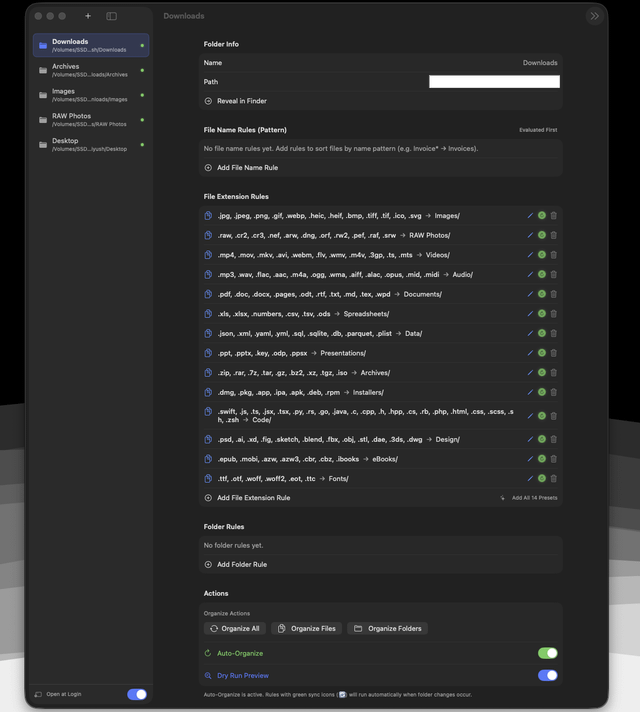
My Downloads and Desktop folders always end up as a dumping ground for installers, screenshots, zips and PDFs. The organizers I tried were either subscription-based or heavy Electron apps, so I built my own: MyFoldy, a native SwiftUI app for macOS. I'm the developer, and it's completely free and open source (MIT).
What it does
- File name pattern rules: wildcard matching like
*Invoice*→Invoices/orIMG_*→Photos/, evaluated first - 14 built-in presets: one-click rules for 100+ extensions (images, RAW, video, audio, documents, spreadsheets, archives, code, fonts, installers)
- Folder rules and exclusions: sort messy subfolders and uncheck any folder you want left alone
- Dry-run preview: shows every planned move (source → destination) before anything touches your disk
- Safe collision handling: never overwrites; duplicates become
file (1).ext - Auto-organize: runs in the background when a folder changes (FSEvents), with Open at Login support
- Dark, minimal UI with spring animations that respect Reduce Motion
Privacy and size
- ~1.6 MB download, pure Swift/SwiftUI
- 100% offline: no telemetry, no analytics, no network requests
- Uses security-scoped bookmarks, so it only accesses folders you add
Links
- GitHub: https://github.com/Piyushingle007/MyFoldy
- Download (.dmg): https://github.com/Piyushingle007/MyFoldy/releases/tag/v1.0.0
Note: the build is self-signed, not notarized, so on first launch you'll need to right-click → Open. If macOS still blocks it, you can run xattr -cr /Applications/MyFoldy.app. The full source is on GitHub if you'd rather build it yourself.
I'd love feedback, bug reports, or ideas for rules you'd want (size/date-based rules, undo, menu bar mode?). What would make this useful for your workflow?
https://i.redd.it/n8v2r0j3xswh1.png
Source: r/MacStack · by /u/TruckOwn2867