Guardian Eye WebCamera 3.0.2 can record on the phone and send each completed segment to an FTP or explicit FTPS server. The phone acts as a short local buffer, while the server keeps the collected recordings.
The transfer starts only after a segment has closed. WebCamera uploads two files with the same time-based name:
ge-20261008T125843Z--20261008T125913Z.mp4 ge-20261008T125843Z--20261008T125913Z.events.json The MP4 contains the recording. The JSON file carries its exact time range and event information. Both files are uploaded under temporary .uploading names, checked on the server and renamed to their final names. WebCamera removes the local pair only after the server has confirmed both files.
Configure local recording first
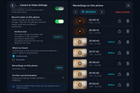
Open Camera & Video Settings and enable Record video on this phone. Choose the archive size and whether the phone should record continuously or only around detected events.
The local archive is a buffer, not permanent storage. The oldest recording is removed when the selected limit is reached, and recordings older than 48 hours are removed in any case. Allow enough space for the longest period during which the FTP server may be unavailable or outside its upload schedule.

Local recording settings and completed recordings. Event-triggered clips are marked in the list; thumbnail contents have been blurred for privacy.
Add the FTP destination
Open Archive synchronization and select FTP/FTPS.

Choose FTP/FTPS as the synchronization method, then enter the server and account details.
- Choose FTP or Explicit FTPS.
- Enter the server address, port, username and password.
- Enter an existing remote directory. The FTP account must be able to select that directory, upload temporary files, read their sizes, rename them and remove an incomplete temporary file when a retry requires cleanup.
- Leave passive mode enabled for a normal home network. Disable it only if the server requires active FTP and can open a data connection back to the phone.
- Tap Test connection. WebCamera requires a successful test before it enables Save connection.
- Save the destination, select FTP/FTPS as the synchronization method and turn synchronization on.

Explicit FTPS certificate selection, remote directory, passive mode, upload schedule and connection test.
The option to reuse the camera credentials is convenient for a small local setup. A separate FTP account is easier to restrict to one server directory and does not expose the camera password to another service.
FTP and FTPS are not interchangeable
Plain FTP sends the password and recording without encryption. WebCamera therefore accepts plain FTP only for private, link-local or loopback addresses. It is suitable for a trusted LAN, but it should not be exposed to the internet.
Explicit FTPS starts as FTP and upgrades the connection with AUTH TLS. Both its control and data connections are protected. A certificate issued by a trusted authority uses the phone's system trust store. For a self-signed server, you can select its X.509 certificate in DER or PEM format. The certificate still has to be valid, and its DNS name or IP address must match the server field.
SFTP is a different protocol based on SSH and is not supported by this setting.
Put every phone in its own directory
Recording names are based on their UTC start and end times. Two phones can produce the same name, so they should not upload into the same directory.
Create the directories on the server first, then configure one on each phone. For example:
/guardian-eye/front-door /guardian-eye/garage /guardian-eye/bird-camera Separate FTP accounts for each phone are optional, but useful. Each account can be limited to its own directory, and a lost password does not expose every camera archive.
Use the schedule as a transfer window
The schedule uses the phone's local time and the selected weekdays. Recordings made outside the window stay queued. If the start and end times are equal, the selected day is treated as an all-day window.
An overnight window belongs to the day on which it starts. A Monday window from 22:00 to 06:00 therefore continues into Tuesday morning.
If a transfer fails, the recording remains in the queue and WebCamera retries it. A leftover .uploading file is not presented as a completed recording. A retry either continues safely from the known final state or replaces an incomplete temporary file.
On iOS, uploads are owned by the foreground app. Moving WebCamera to the background stops the current network work; queued recordings resume after the app returns to the foreground.
For a first test, use a short recording, leave the schedule off, and confirm that the server receives both the .mp4 and .events.json files. Then enable the schedule and repeat the test before relying on it for a longer archive.
Which FTP or FTPS server are you using? Reports from Synology, QNAP, TrueNAS, Windows and Linux servers are useful when they include the server software, whether FTP or FTPS was selected, and the exact error shown by the connection test.
Source: r/GuardianEyeApps · by /u/sullivan-01