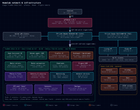
Long-time lurker, first proper post. This is where my homelab has ended up after a big "move everything to git-managed compose stacks" cleanup this month. One TrueNAS box does nearly all that I need, when prices are better or I win the lottery, will definitely look to upgrade.
Any ideas/suggestions would be much appreciated.
Images are my full network diagram and Homarr dashboard.
Hardware
- Board/CPU: Intel server board (M10JNP2SB), Xeon E-2146G (6C/12T), Quick Sync for transcoding
- RAM: 64 GB
- Boot: mirrored SSDs (120 GB Crucial + 250 GB Samsung Evo, the other crucial failed)
- Data pool: 8 x 8 TB WD Red in a single RAIDZ2 vdev, 58 TB raw (~32 TB used), lz4
- Network: Chelsio T520-CR dual-port 10G SFP+ NIC (LACP bond), with tagged VLANs
- Management: IPMI/BMC. Out-of-band access has saved me more than once
Network hardware
- Firewall/router: pfSense 2.8.1 on a 6-port mini PC: Intel N100 (4 cores), 8 GB RAM, 128 GB NVMe, 6x Intel i226-V 2.5G NICs
- Core switch: TP-Link Omada SG3428X-M2: 24x 2.5G RJ45 + 4x 10G SFP+
- PoE switch: TP-Link Omada SG2210XMP-M2: 8x 2.5G PoE+ (160 W budget) + 2x 10G SFP+
- Wi-Fi: 2x TP-Link Omada EAP723 Wi-Fi 7 ceiling APs (PoE-powered)
- All of it is managed from a self-hosted Omada controller running in a container on the TrueNAS box
- Cameras: all PoE Reolink: 1 x RLC-811A, 3x RLC-510A and the Reolink 2K 5MP PoE doorbell, on an isolated camera VLAN. Frigate records them with OpenVINO object detection on the iGPU
- pfSense packages: AdGuard Home, HAProxy, ACME (wildcard cert), WireGuard, OpenVPN, Suricata (IDS), ntopng, vnStat traffic totals
Software
- TrueNAS SCALE 25.10 (Goldeye), with Docker as the app runtime
- Two always-on VMs: Home Assistant OS, and my AI assistant (Hermes, which was helpful with a lot of this build)
- Datasets split by purpose (media, containers, nextcloud, backup, vm, users), 539 ZFS snapshots on a schedule
Containers (about 51 across 28 stacks)
- Media automation: the usual self-hosted media server plus request, automation, indexer and download stack, with a transcoding flow and a monitoring/stats layer
- Photos and files: Immich (with ML), Nextcloud (MariaDB, Redis, cron), Stirling-PDF
- Identity and security: authentik (OIDC SSO plus forward-auth for apps without OIDC), Vaultwarden, fail2ban (bans pushed to pfSense)
- Monitoring: Uptime Kuma, Beszel, Scrutiny (SMART), Traefik dashboard, ntfy for push alerts
- Cameras: Frigate, integrated with Home Assistant
- Misc: Homarr, IT-Tools, ZNC, Omada controller, Watchtower for daily image updates
- Management: Dockhand, a Docker UI that deploys every stack straight from a git repo
Networking / infrastructure
- pfSense edge firewall with a LAGG uplink and tagged VLANs, HAProxy for the few public services, and the ACME package handling a wildcard cert
- Two traffic paths: public apps go pfSense HAProxy → container. Internal apps go Traefik v3 → container
- DNS: AdGuard Home runs on the pfSense box
- TP-Link Omada (SDN controller) for Wi-Fi and switching
- Split DNS: AdGuard Home resolves internal hostnames straight to Traefik, so the same names work inside the LAN without hairpinning through the firewall. Public apps keep real client IPs end to end, so fail2ban sees real addresses
- Internal-only services have no public HAProxy route at all, so a bad HAProxy rule can't expose them
How it's managed
- One repo, one directory per stack,
compose.yamlplus astack.env.example(key names only) - No secrets in git. They live in root-only
.envfiles on the host, and a pre-commit hook blocks accidental commits - Dockhand pulls each stack from git, and Watchtower updates floating-tag images. Core infra (Traefik, databases, authentik) is pinned and updated by hand
- Backups are done via Restic, anything that isn't git-managed, or I can't just download again is shipped offsite to S3-capable endpoints
Lessons learned
- MTU black holes across VLANs: TrueNAS bridges at MTU 9000 and the pfSense VLANs at 1500: small replies worked, big ones hung silently. Fix: create the VLAN on TrueNAS at 1500 and use it as the Docker ipvlan parent – This took a lot longer to figure out than I care to mention here 😄
- Docker bridge containers and the host can't talk to containers on an ipvlan network, and the reverse. This was known, just something to keep in mind when designing your internal docker networks.
What's next
- Offsite backup improvements (can always be better)
- New IoT vlan for everything else that isn't 'trusted'
https://www.reddit.com/gallery/1wzpffq
Source: r/homelab · by /u/tabmowtez