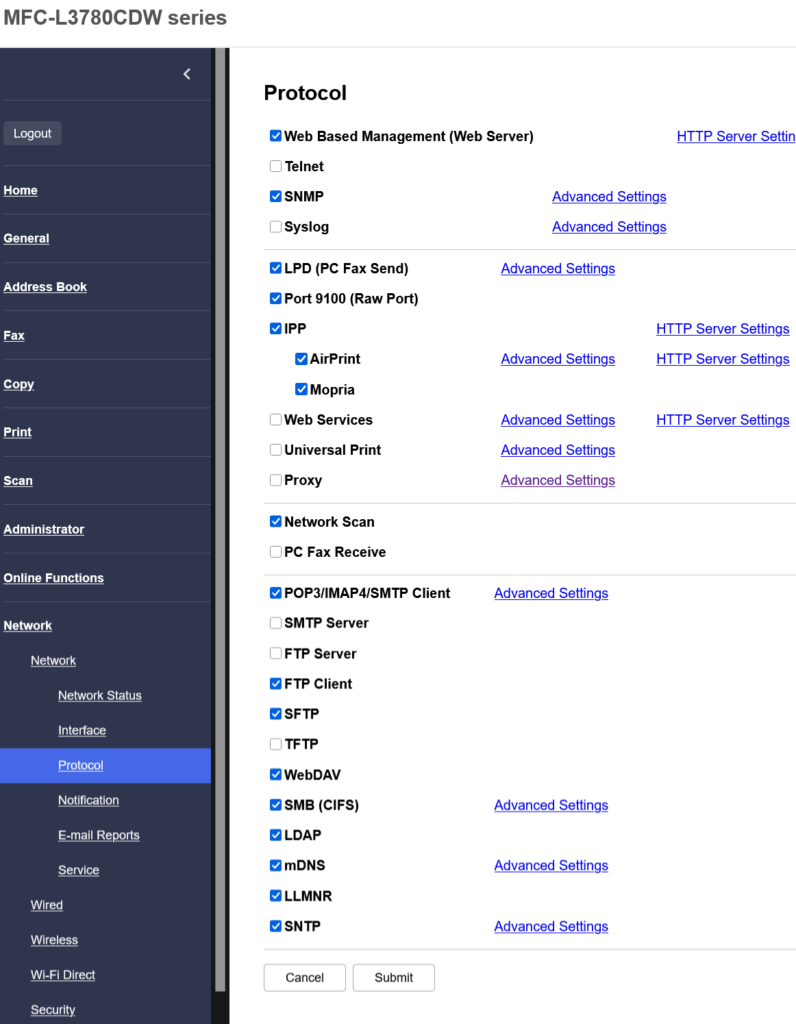
Look at this list of networking protocols and printer
Here's a brief history.
- Microsoft and PCs used printer drivers way back to DOS days
- Linux and then MacOS stopped using them a long time
- New print protocols popped up and Microsoft tried to make installation automatic
- Wireless stuff showed up and created more havoc
- Scanning and printing on the network never got coordinated, with each manufacturer doing something different for multifunctions
- PrintNightmare happened in 2021 to Windows, a security vulnerability
- Microsoft moved away from drivers, choosing Mopria, similar to Apple AirPrint and using the same port, this is the Internet Printing Protocol, IPP
- Microsoft decided to revoke all new 3rd-party drivers and force 3rd parties to use IPP and helper apps (UWP-style apps) for those functions not available industry-wide. That began in January 2026.
- In the last couple of days, Windows 11 now discusses and recommends "Windows Protected Print Mode" which uses Mopria certification and driverless configurations and what I still call drivers. They link to the Mopria website and its certified list rather than telling the user if it's on the list or not.
- Microsoft currently lets users turn "Windows Protected Print Mode" on or off.
- IPP has some amount of similarity now between Windows, Linux, and Mac, but I am not satisfied I can explain the differences without research or actually caring to know.
What protocols should I check and why? Which ones are secure and will allow me to tell my printer to do something special with paper, toner, or scanning speed?
https://i.redd.it/4058d27p61jh1.png
Source: r/printers · by /u/publiusvaleri_us