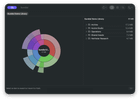
A few weeks ago my Mac ran out of disk space, and I wanted to see what was using it. I didn't want to give a random app access to my whole drive, so I wrote a small one for myself. I liked using it enough that I kept working on it. It's now Sundial, on the Mac App Store.
You pick a folder and see where the space goes as a sunburst, a treemap, or a plain list. Select any item to reveal it in Finder or move it to the Trash (it asks first).
Privacy first. A disk analyzer sees your whole folder structure, so I built Sundial to keep all of it on your Mac:
- No network access at all. The app is sandboxed without the network permission, so macOS itself blocks it from connecting to anything.
- No analytics, no tracking, no ads, no account. There's no third-party code in the app.
- It never opens your files. It reads names and sizes only, never file contents.
- Minimal saved data. Each saved scan keeps folder names and totals only. File names are never written to disk. You can forget every saved scan from the app.
- Your permission, every time. It only sees folders you pick, and it asks again at each launch.
Then speed and correct numbers:
- Fast scans. Sundial reads directory entries in batches and scans the top-level folders in parallel. On my Mac, my home folder (about 2.9 million items, 235 GB) takes about 24 seconds.
- Almost instant reopen. The saved scan shows up in under a tenth of a second. Then Sundial uses the macOS file system event log to rescan only the folders that changed. If that history is incomplete, it does a full scan. It won't show a size it can't trust.
Sundial only sees what macOS lets it read, so protected system files can be missing from a scan. It needs macOS 14 or later.
It's free right now. On October 1 it becomes a one-time US$4.99 purchase in the US, and before that I'd really like honest feedback. Is it fast enough on your Mac? What's missing compared to the tool you use now? Would you pay for it?
Screenshots and details: https://mathd.com/sundial/

Source: r/MacOS · by /u/mathd1