Hey everyone,
I recently replaced my old router (an old TP-Link TL-WR841N v10.1 that had terrible local freezing issues). The hardware swap completely fixed the local disconnects, but I've run into a weird new networking quirk on my Mac with the new hardware.


My Mac's System DNS keeps failing, but Public DNS works completely fine. The physical internet connection doesn't drop at all.


If I manually set my Mac's DNS settings to Google (8.8.8.8) or Cloudflare (1.1.1.1), or if I manually ping a public IP address, everything resolves instantly. But when I leave my Mac on the default "automatic" network settings to let the new router assign the DNS via DHCP, the system-level resolution completely falls apart.
What I've tried so far:
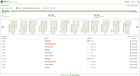
I assumed it was a stale cache left over from the router swap, so I ran sudo killall -HUP mDNSResponder in Terminal to flush the DNS cache and restart the responder daemon. Unfortunately, even after the flush, the system DNS error keeps coming back. (I'm using a monitoring utility called UptimeLog which is how I'm seeing the persistent system DNS failures pop up).
Why would macOS fail to use the new router’s default DNS translation while public paths remain totally clear? Could this be a DHCP search domain conflict, or is there something specific I need to change in my new router's local DNS proxy configuration?
Source: r/HomeNetworking · by /u/petgibbons