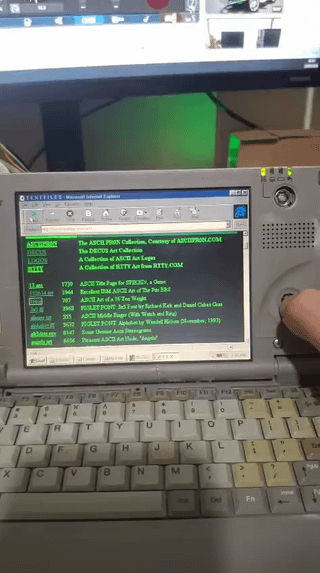
I connected my Toshiba Libretto 70CT to the internet using an ESP32 as a modem
Today I decided to experiment with my Toshiba Libretto 70CT from 1997, and I managed to connect it to the internet using an ESP32.
The notebook is currently limited to only 14 MB of RAM because it reports an error when trying to read a memory address. Even with such a small amount of available memory, it can still run Windows, connect to the internet and open some lightweight websites.
First, I connected the Libretto’s COM1 port to a MAX3232 module, which is connected to GPIO 16 and 17 on the ESP32. I made firmware that allows me to talk to an AI through HyperTerminal. I type a message on the Libretto, it goes through the serial connection to the ESP32, and the ESP32 sends an HTTPS request in JSON format to the Ollama Cloud API. The response then comes back through the serial connection and appears in HyperTerminal.
After that, I wondered if I could use it to browse the internet as well. I adapted the firmware using ESP-IDF and Espressif’s eppp_link component. I made the ESP32 respond to AT commands like an old modem and configured Windows to dial 777 through COM1.
When Windows “dials,” the ESP32 responds with CONNECT 9600 and starts a PPP connection over the serial port. LCP establishes and configures the link, IPCP negotiates the IP address and DNS, and the ESP32 forwards the packets to Wi-Fi using NAT. There is no telephone line involved. The ESP32 is simply pretending to be a modem so that Windows can understand the connection.
The connection is limited to 9600 bps, so it is very slow, but I managed to open lightweight websites such as textfiles.com. The same ESP32 now has two uses: accessing AI through HyperTerminal and providing internet through Windows Dial-Up Networking. I just have to close one before using the other because both use the same serial port.
Also, please excuse the condition of the case. I rescued this notebook when it was about to be thrown away by the company where I work. I tried to repair it using whatever I had available. I am not very skilled at this, but I enjoy keeping this little machine alive.
It took a lot of work to configure everything on such an old version of Windows, especially with the notebook limited to 14 MB of RAM, but seeing the connection icon and a website opening on it was very satisfying hahaha.
Sorry if my English sounds strange. I do not speak English yet, so this text was translated with the help of AI.
Greetings from Brazil!
https://v.redd.it/2dnt94jmb9rh1
Source: r/toshiba · by /u/Gengar_1996