Tested on 26.4, 26.6.1, 26.6.2. Does not work on 26.4 Betas
so there is this tool called nugget. The tool
it has the ability to supervise devices, and with a supervised device you can install a profile that blocks screen time.
1. Prerequisites
• Download the profile
• after you’ve downloaded it, you need to find the file and rename its extension from .mobileconfig to .p12 as the profile is unsigned
• now have that profile ready.
2. Setup
• now you need to go to your pc and in your browser open the link https://github.com/leminlimez/nugget, go to releases page and select the appropriate version for you(linux is for linux, you need to install additional python dependencies, ask me in the comments for guide; intel mac is for macs that came earlier than 2019-2020, windows is for regular laptops and apple silicon is for m1, m2, m3, m4, m5 and so on macs)
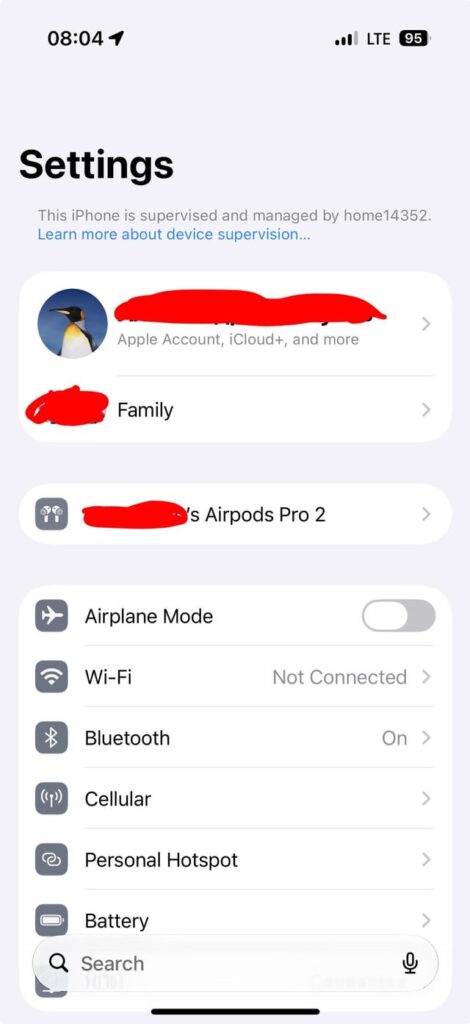
• when it downloads, go to this file and unzip it. then, go into the newly created folder and run nugget. on macs, you need to run Nugget.app, on windows Nugget.exe. you should get a black window in a few seconds. Go to settings and click the checkboxes for Skip Setup and Enable Supervision. in text box under Enable Supervison write any text you like, it will be visible on top of the settings like in the photo that i attached.
3. iPhone Setup
Now are the important steps. read carefully and if you have any questions, don’t be scared to ask.
1. you should go into [your name] > Find My > Find my iPhone and disable the first switch named Find My iPhone. it will ask for your apple account password and if written correctly, disable itself.
2. now comes the easy part. go into general > VPN & Device Management(or just Device Management, idk) and remove any profiles or dns servers there? because if you don’t do that every time you change supervision settings the profiles would disappear. if you have side loaded apps, don’t uninstall them, they won’t disappear. when you have done all of that, connect the phone to the computer via a cable, go into apply page in the app on the pc and press “apply tweaks”. your phone will reboot. now just go into the files app, press the profile(if it prompts asking where to install, select iphone). on the phone go into settings > general > VPN & Device Management, tap on the profile named ByeScreenTimeiOS, select install in the top right corner, enter your password consent to everything if it asks, press install is it asks you, CONGRATS, YOU ARE AWESOME. NOW IF YOU PRESS ON THE SCREEN TIME IN SETTINGS IT’LL SHOW THAT SCREENTIME IS RESTRICTED AND ALSO ALL THE RESTRICTIONS LIKE DOWNTIME, LIMITS ETC WILL GO AWAY
https://i.redd.it/iw6fjvjma0rh1.jpeg
Source: r/BypassingScreentime · by /u/Valuable-Book-5573