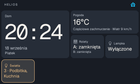
Google's assistant on these little clocks is on its way out, and the Lenovo Smart Clock 2 has no USB data port – the micro-USB on the dock is power only. So there is no adb, no fastboot, no obvious way in. I spent a while on it and ended up with three things I'm putting up here.
1. Root over Wi-Fi, from a bug in the GPU driver
The PowerVR DDK on this firmware has a dense fast path in _PMRLogicalOffsetToPhysicalOffset() that writes where it shouldn't. That gives a kernel write primitive, which gives a usermode helper running as root, which gives a root channel, SSH on 2223 and ADB over Wi-Fi. One button in the app walks the whole chain.
Everything is runtime-only. Nothing is flashed, nothing persists: a power cycle puts the clock back to stock, and you run the chain again if you want it back. Built and verified on retail LenovoCD-24502F_ROW_1.2.2.627_220105 (MT8167, kernel 4.14.141, Android 10).
https://github.com/SychPL/smartclock2tool
2. A replacement for the assistant

Helios is a sideloaded launcher that turns the clock into a Home Assistant panel:
- A 4×3 dashboard described in your Lovelace YAML. Save the YAML, the clock re-renders – no new APK, no per-device config.
- Local wake word. "Okay Nabu" runs on the device (microWakeWord, ARMv7). Nothing is recorded or sent before it fires; then the mic streams into the HA Assist pipeline over the same WebSocket.
- Music Assistant. The clock registers as a Sendspin player, with a library browser and a full-screen player, and can drive your other speakers too.
- Pairing without tokens: the clock finds HA over mDNS, HA shows a six-digit code, and the integration mints the clock its own non-admin local user. No long-lived admin token ever lands on the device.
https://github.com/SychPL/helios and https://github.com/SychPL/ha-helios
3. The part I'm actually happiest with
Helios never gets root. The tools app exposes a closed list of privileged operations – switch ADB, grant a permission the caller already declares, become the home app, take the microphone back from the factory assistant, install its own update – and nothing else. Callers are identified by signing certificate and named on screen before anything happens; a different certificate starts from zero. No shell, no arbitrary commands.
Things worth knowing before you try it
- One firmware build is verified. Other builds may or may not work.
- ADB over Wi-Fi is open to anyone on your LAN who can reach port 5555. Turn it off when you're done.
- A few bridge operations have unit tests but have not been exercised on real hardware yet – that's called out in the release notes.
- This is owner tooling for hardware you own.
One detail that cost me a day
Since some firmware update, the mic HAL on this clock delivers roughly six times the requested sample rate while still reporting 16 kHz. Wake word detection just stopped working, and the logs looked fine. The fix is a decimator that measures the true rate and resamples – a small thing, but you won't find it in any datasheet.
Source: r/homeassistant · by /u/Salty_Emu_4775